 Vera Clarissa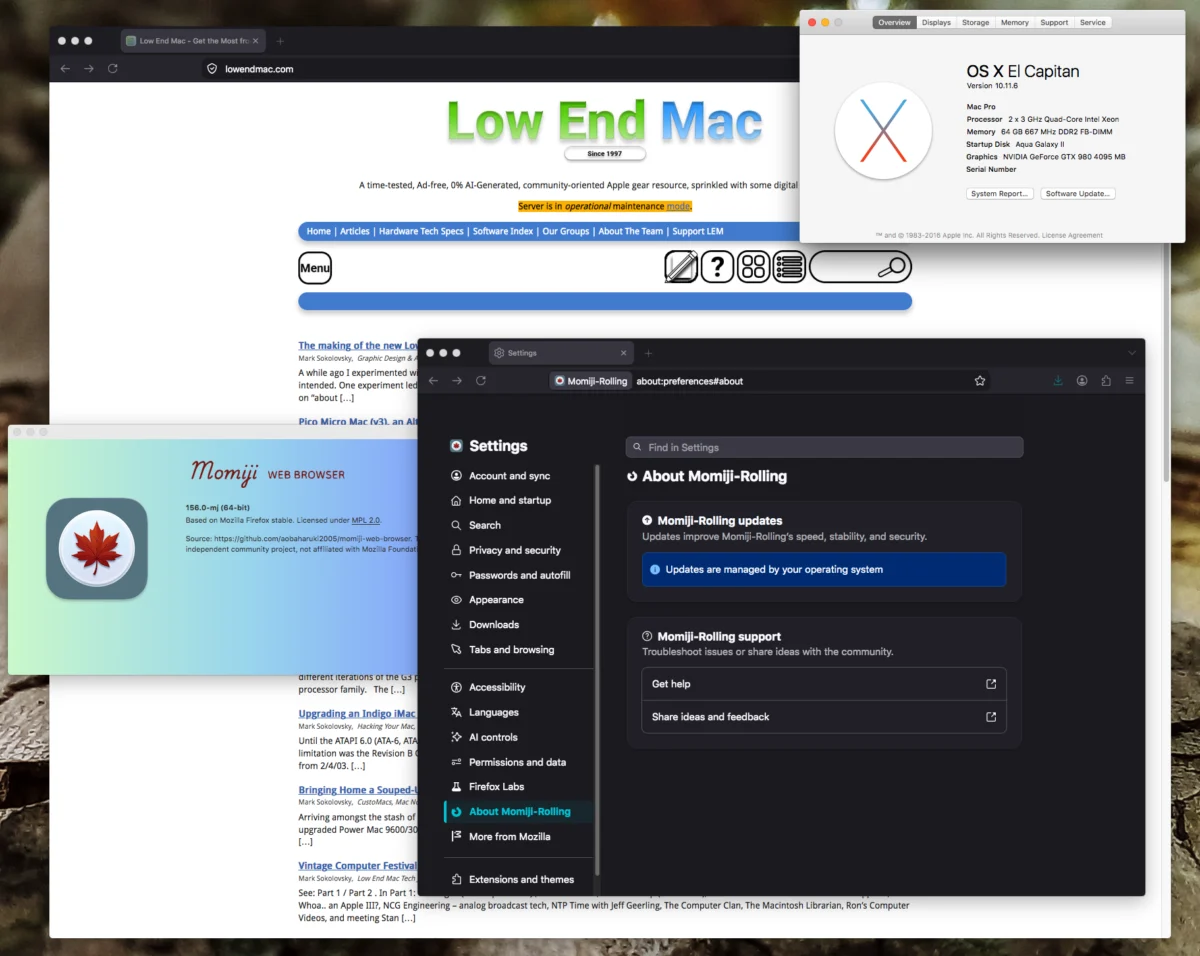
The landscape of legacy computing has shifted significantly this month following the release of updated versions of the Momiji web browser by developer aobaharuki2005. The project, hosted on GitHub, has introduced two distinct paths for users of aging Apple hardware: the stable Momiji v140.16 and a cutting-edge, rolling-release build based on the Firefox 156.0 engine. This development serves as a critical bridge for 64-bit Intel-based Macintosh computers, effectively extending the functional lifespan of systems running operating systems ranging from OS X Lion (10.7) through macOS Mojave (10.14).
The Technical Context of the Release
The Momiji browser project targets a specific segment of the Apple ecosystem: the transition-era machines equipped with 64-bit Intel Core 2 Duo processors (Conroe and Merom architectures). This hardware milestone, which began in the mid-2000s, represented the foundational shift from PowerPC to Intel architecture. However, as the web has evolved toward more complex JavaScript frameworks and rigorous security protocols, native support for these older operating systems has dwindled, rendering most stock browsers obsolete and insecure.
The release of Momiji v156.0 is particularly notable because it leverages the underlying architecture of the most recent Firefox iteration. By porting these contemporary web standards to legacy environments, the browser ensures that users can access modern encrypted websites and web applications that would otherwise trigger certificate errors or rendering failures on outdated software. The update includes comprehensive security patches, aligning these two-decade-old machines with the current industry standards for web safety.

Chronology and Development Timeline
The Momiji project has undergone a rapid acceleration throughout the summer of 2026. The evolution of the browser can be tracked through its versioning history:
- Mid-Summer 2026: Initial stability benchmarks were established with the release of v140.12. Users reported that this version significantly improved the daily-driver viability of systems such as the Mac Pro 2,1 and various MacBook Pro models from the 2006–2008 era.
- Early September 2026: Developer aobaharuki2005 pushed the stable v140.16 build, focusing on long-term reliability and minor bug fixes for the legacy codebase.
- Late September 2026: The introduction of the rolling build based on Firefox 156.0 marked a transition toward more aggressive optimization. This build is intended for power users who require the latest web compatibility at the cost of potential stability fluctuations inherent in "rolling" software development.
Performance Analysis and Benchmarking
While synthetic benchmarks are often criticized for failing to capture the nuance of daily usage, they remain the standard for evaluating browser efficiency. Momiji 156.0 achieved a score of 4.29 on the Speedometer 3.1 benchmark. While this figure may appear modest when compared to modern silicon architectures (such as Apple’s M-series chips), it represents a marked improvement for hardware that is effectively twenty years old.
The practical improvements, however, transcend raw benchmark scores. User reports and diagnostic tests indicate significant gains in interface responsiveness. The "hang" times typically associated with tab management, window resizing, and full-screen transitions—often the primary points of failure for older browsers—have been drastically reduced. The browser’s ability to manage memory allocation allows users to maintain multiple tabs simultaneously, a task that previously necessitated the frequent closing of applications to free up physical RAM.
Hardware Compatibility and System Requirements
The browser is distributed through two specific build branches, tailored to the underlying OS architecture:

- The Lion-through-El Capitan Branch: This version is optimized for the older 64-bit Intel machines that have reached the end of their official support lifecycle.
- The Sierra-through-Mojave Branch: This build caters to the final generation of Intel Macs that were capable of running macOS Mojave before the transition to the more restrictive security requirements of macOS Catalina and beyond.
A critical limitation for prospective users is the CPU requirement. Momiji requires a 64-bit Core 2 Duo processor. Early Intel machines equipped with the "Core Duo" (the 32-bit predecessor) are strictly incompatible with the current codebase. This hardware requirement ensures that the browser can take advantage of 64-bit memory addressing, which is essential for rendering modern, data-heavy web pages.
Broader Implications for Legacy Computing
The continued development of Momiji speaks to a growing movement within the technology community to combat electronic waste and preserve functional computing history. By enabling modern web connectivity on hardware from 2006, the project offers a viable path for those who wish to maintain these machines for secondary tasks, such as legacy software development, archival work, or retro-computing appreciation.
From an industry perspective, the success of the Momiji project highlights the importance of open-source contributions in maintaining software longevity. When official support for a platform ends, the burden of security and compatibility often shifts to independent developers. The integration of the Firefox engine into the Momiji project is an example of effective modular software design, where the heavy lifting of security compliance is outsourced to a modern, actively maintained engine, while the specific "shim" layers that allow for legacy OS compatibility are handled by the Momiji team.
User Experience and Community Response
Community response, particularly among users of the Mac Pro 2,1 (the "Clovertown" Xeon era), has been overwhelmingly positive. The ability to run a modern, responsive browser has, for many, fundamentally changed the utility of their systems. The "daily-driver" status of these machines has been restored in a way that was not possible a year ago.

The installation process remains straightforward: users download the appropriate package from the GitHub repository and place the application in the standard Applications directory. For those upgrading from previous versions of Momiji or standard Firefox installations, the browser is designed to preserve user profiles, including bookmarks, browsing history, and saved credentials, provided the application is labeled correctly in the filesystem.
Future Outlook
As web standards continue to shift toward higher performance requirements, the longevity of the Momiji project will likely depend on the continued accessibility of the core Firefox engine. The developer’s commitment to providing both a stable and a rolling build suggests a dual-track strategy: one that prioritizes enterprise-like stability for those who need a set-it-and-forget-it solution, and another that satisfies the demand for the latest features for enthusiasts.
The significance of this development cannot be overstated. It effectively grants a second life to thousands of machines that would otherwise be relegated to landfills or display cases. As of late September 2026, the combination of Momiji 156.0 and a well-configured Core 2 Duo Mac represents the current pinnacle of what is possible for legacy Apple hardware in the modern digital age. Whether this will lead to further hardware-specific optimizations or the potential for even older systems to gain similar capabilities remains to be seen, but the precedent set by aobaharuki2005 serves as a template for future developers working in the legacy software space.