Farhan hamdan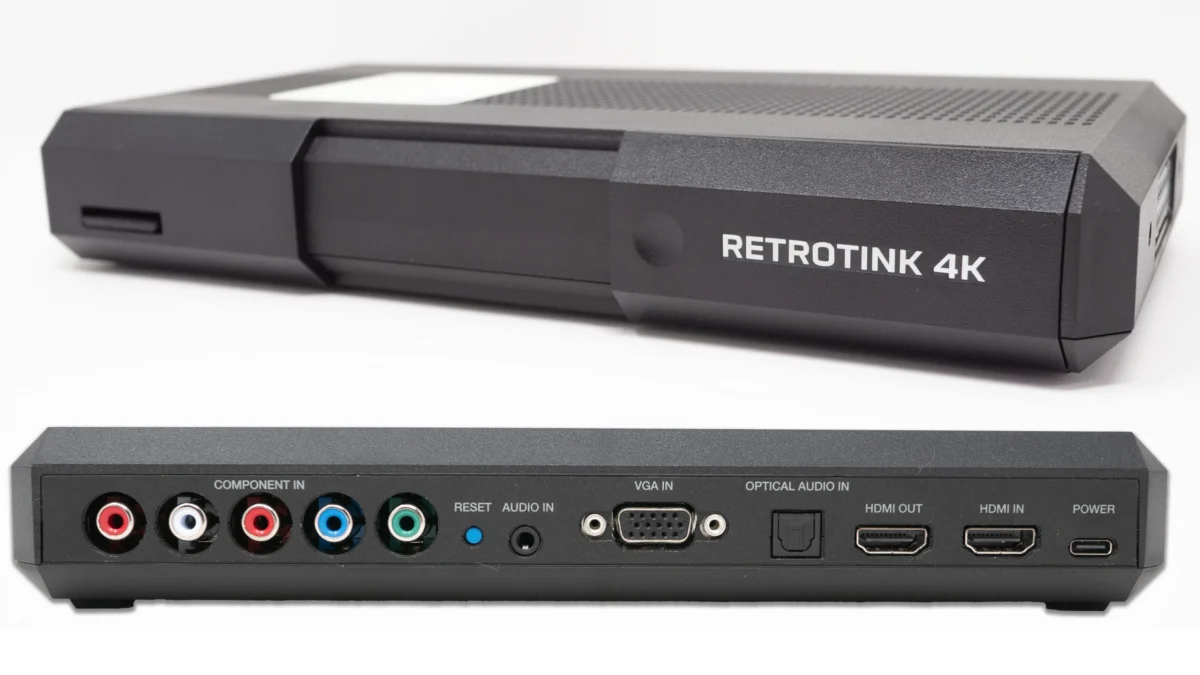
Mike Chi, the acclaimed developer behind the RetroTINK line of video upscalers, has released a series of substantial firmware updates for the RetroTINK 4K, introducing a suite of features designed to streamline configuration, improve visual accuracy, and enhance overall user experience. These updates, available immediately, address various aspects of the device’s functionality, from scaling algorithms and menu navigation to profile management and visual effects, solidifying the RetroTINK 4K’s position as a premier solution for connecting classic gaming consoles to modern high-definition displays.
Among the most anticipated additions is the "Auto Fill Int+" scaling option, a feature analogous to the "Over" functionality introduced with the RetroTINK 5x. This innovation simplifies the process of achieving optimal 5x or 10x integer scaling for 240p source material, a crucial aspect for retro enthusiasts seeking pixel-perfect reproductions on 1080p and 4K displays. Previously, users often had to manually configure proportional scaling settings, a multi-step process that could be time-consuming. The Auto Fill Int+ option automates this, providing a one-click solution that saves considerable setup time, particularly for those frequently switching between games or systems.
Accompanying Auto Fill Int+ is a new "Vertical Pan" option, which grants users fine-tuned control over image positioning. This allows for vertical adjustment of the scaled image, addressing scenarios where game content might be slightly cut off at the top or bottom due to overscan or underscan characteristics of the original signal or display. This seemingly minor tweak offers significant quality-of-life improvements, ensuring that the entire game area is visible and optimally centered. The utility of this feature extends to advanced setups, including MiSTer FPGA systems utilizing HDMI direct video, where a single setting can now apply consistent "over" scaling and vertical adjustment across all cores, drastically simplifying configuration.
The Evolution of RetroTINK 4K: A Commitment to Perfection
Mike Chi’s journey with the RetroTINK series began with a clear mission: to provide high-quality, low-latency video upscaling solutions that preserve the integrity and aesthetic of classic video games on contemporary displays. The initial RetroTINK products quickly gained traction within the retro gaming community, culminating in the highly successful RetroTINK 5x-Pro, which set a new standard for performance and features. The RetroTINK 4K, launched as its successor, pushed these boundaries further, offering native 4K output, advanced processing capabilities, and an unparalleled level of customization.

Since its introduction, the RetroTINK 4K has been characterized by a philosophy of continuous improvement through regular firmware updates. This iterative development model allows Chi to respond directly to community feedback, implement new features, and refine existing functionalities, ensuring the device remains at the cutting edge of retro video processing. Each update builds upon the last, progressively enhancing the user experience and expanding the device’s versatility. This commitment to ongoing support distinguishes the RetroTINK brand in a market often characterized by static hardware releases. The current set of updates is a testament to this philosophy, introducing refinements that address both common user pain points and advanced configuration needs.
Auto Fill Int+: Streamlining Optimal Scaling for Authentic Retro Visuals
The core of the "Auto Fill Int+" update lies in its intelligent application of integer scaling, a method crucial for maintaining pixel-perfect fidelity when upscaling low-resolution content. For 240p games, the gold standard for many enthusiasts is either 5x scaling to 1080p or 10x scaling to 4K. Integer scaling ensures that each original pixel is magnified by a whole number, preventing artifacts, uneven pixels, and shimmering that can occur with non-integer scaling methods. This results in a cleaner, sharper image that closely emulates the crispness of a native low-resolution display, albeit at a higher resolution.
The "Over" concept, now implemented as Auto Fill Int+, acknowledges that some scaling factors (like 5x for 240p to 1080p) may not perfectly fill a modern widescreen display while maintaining integer ratios. Instead of forcing a non-integer stretch, the "Over" approach prioritizes integer scaling and allows for a slight overscan, similar to how CRT televisions often displayed images. This "CRT-overscan-like-look" is particularly beneficial when combined with CRT mask emulation, a feature that overlays simulated scanlines and aperture grille patterns to replicate the distinct visual characteristics of a Cathode Ray Tube. By ensuring a consistent integer scale, the CRT masks are rendered uniformly, without distortion or uneven pixel distribution, leading to a more convincing and immersive retro experience.
For users connecting 480p sources, the advice remains similar, though 1440p output to a 4K TV can be an effective intermediate step. While most modern 4K displays handle 1440p well, users should monitor the appearance of CRT masks; if they appear uneven, reverting to integer options is recommended. For those with native 1440p displays, the situation is simpler, as 1440 is a perfect integer multiple for both 6x (240p) and 3x (480p), obviating the need for an "over" option. This level of granular control and intelligent automation underscores the RetroTINK 4K’s capacity to cater to a diverse range of setups and preferences, from casual players to purist enthusiasts.
Introducing Simple Mode: Accessibility for All

Recognizing that the RetroTINK 4K’s extensive feature set, while powerful, could be daunting for new users or those preferring a streamlined experience, Mike Chi has introduced "Simple Mode." Accessible via the OSD/Firmware Menu, this mode transforms the main menu interface into a concise, quick-option display. Upon activating the menu button, users are presented with direct access to fundamental functions such as input selection, output resolution, scaling options, and curated starter profile packs.
The inclusion of starter profile packs is a significant addition. These pre-configured profiles are designed to offer excellent performance for common console setups and, critically, provide immediate access to high-quality CRT masks. While the RetroTINK community excels at developing highly specialized and intricate "expert packs," these starter profiles lower the barrier to entry for achieving impressive visual results without requiring deep technical knowledge. Simple Mode, combined with these accessible presets, empowers a broader range of users to quickly optimize their retro gaming experience, fostering greater adoption and enjoyment of the RetroTINK 4K’s advanced capabilities. The vertical pan option, a key feature of the Auto Fill Int+ functionality, is also readily available within Simple Mode, further emphasizing user convenience.
Enhanced Profile Management: Precision and Flexibility
The new firmware also introduces two highly requested options within the Menu Profiles section: "Keep Current Input" and "Keep Current Resolution." These additions significantly enhance the flexibility and efficiency of managing custom profiles, particularly for users who frequently experiment with different settings or share profiles within the community.
"Keep Current Input" overrides a profile’s saved input setting, allowing the user to retain their currently active input source when loading a new profile. Similarly, "Keep Current Resolution" overrides a profile’s saved output resolution and scaling, preserving the current display resolution and scaling method. These options are invaluable when, for instance, a user is testing various CRT mask profiles that might have been created with different input or output settings. Without these toggles, switching between such profiles would necessitate manually re-selecting the desired input (e.g., from SCART to YPbPr) and output resolution (e.g., from 4K60 to 1080p120) after each profile load, a tedious and time-consuming process.
While these toggles offer immense convenience for experimentation and quick adjustments, the developer advises caution for routine use. Certain profiles, such as the "VHS Profiles," are intentionally tied to specific input settings (e.g., 3D Comb filter enabled for composite video, disabled for S-Video) to achieve their intended aesthetic. For such specialized profiles, it is generally recommended to leave "Keep Current Input" and "Keep Current Resolution" off to ensure the profile loads with its full, intended configuration. However, for iterative testing or temporary modifications, these new profile management options represent a substantial workflow improvement, giving users greater control over how profiles are applied without irreversible changes.

Refinements in Black Frame Insertion (BFI) Menu
The Black Frame Insertion (BFI) functionality, a critical feature for reducing motion blur and simulating the persistence of vision characteristic of CRT displays, has also received an update. The BFI menu now features a more intuitive user interface. The "Blur" option, which is context-dependent, will now be greyed out when it is not applicable or in use, providing clearer visual feedback to the user. Furthermore, the informational pattern displayed at the bottom of the BFI menu has been updated to show both CRT Beam and Variable MPRT (Moving Picture Response Time) status. This enhanced visual cue helps users better understand the effect of their BFI settings and aids in configuring optimal motion clarity and CRT simulation for their specific display and preferences. These visual refinements contribute to a more user-friendly and informative experience when tuning this advanced visual effect.
Addressing the VHS Pack and Other Bug Fixes
Beyond the new features, the firmware update also includes important bug fixes and optimizations, crucial for maintaining the stability and reliability of the RetroTINK 4K. A notable fix addresses an issue with the VHS pack modelines. A small bug was discovered in the previous modeline page, necessitating a re-saving and update of these specific profiles. While using the older VHS pack modelines would not cause harm, it would require users to manually set the resolution afterwards, negating some of the automation. The updated VHS pack, now available for download, ensures full automation and proper functionality, and users who previously downloaded the pack are advised to re-download the latest version for an optimal experience. This attention to detail in bug resolution underscores Mike Chi’s commitment to delivering a polished and dependable product.
The Broader Impact: Elevating the Retro Gaming Experience
These latest firmware updates for the RetroTINK 4K collectively represent a significant step forward in optimizing the retro gaming experience on modern displays. By simplifying complex scaling options with "Auto Fill Int+," making advanced features accessible through "Simple Mode," enhancing profile management flexibility, and refining visual fidelity tools like BFI, Mike Chi continues to push the boundaries of what is possible in retro video upscaling.

The emphasis on user-friendly features, alongside powerful technical capabilities, reinforces the RetroTINK 4K’s status as a leader in its field. It empowers a broader audience to enjoy classic games with unparalleled visual quality, bridging the gap between nostalgic hardware and contemporary display technology. As the retro gaming community continues to grow, the demand for sophisticated yet intuitive solutions like the RetroTINK 4K will only intensify, and these latest updates ensure the device remains at the forefront of this evolving landscape, offering both precision for purists and simplicity for casual enthusiasts. The continuous development cycle, driven by direct engagement with its user base, positions the RetroTINK 4K not just as a product, but as an evolving platform dedicated to preserving and enhancing the legacy of video game history.
Official Downloads and Resources:
Users can download the latest experimental firmware for the RetroTINK 4K and access updated resources via the following links:
- Download RetroTINK 4K Experimental Firmware: https://retrotink-llc.github.io/firmware/4k-experimental.html
- Purchase RetroTINK Products: https://retrorgb.com/retrotink.html
- Updated VHS Pack / Modelines: https://www.retrorgb.com/assets/RT4K_VHS_2026-06-12.zip