 Farhan hamdan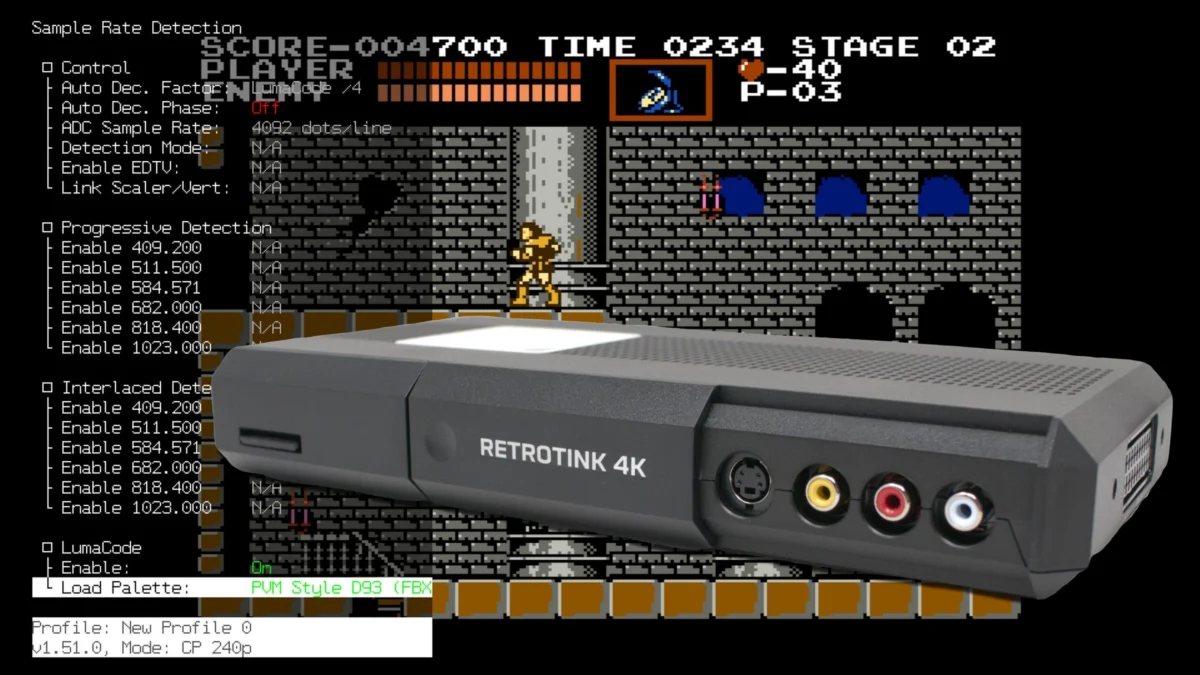
Mike Chi, the acclaimed developer behind the RetroTINK series, has initiated a significant advancement for the retro gaming community with the release of an experimental firmware update for both the RetroTINK 4K Pro and RetroTINK 4K CE devices. This update introduces preliminary Lumacode support, marking a pivotal moment for enthusiasts seeking to achieve unparalleled signal purity from classic consoles, particularly the Nintendo Entertainment System (NES). While acknowledged as a nascent implementation that may exhibit initial bugs, its introduction is a testament to the ongoing commitment to pushing the boundaries of retro video upscaling technology. This firmware also brings several other notable improvements, including an updated Horizontal Blur filter engine for the 4K Pro, a "Native Sampling" option, and a practical shortcut via the AUX4 button for resetting input crops.
The Groundbreaking Integration of Lumacode
The most anticipated feature of this experimental firmware is undoubtedly the preliminary support for Lumacode. Lumacode, a sophisticated video encoding technique developed by c0pperdragon, aims to deliver a pristine digital representation of analog video signals, bypassing the inherent limitations and artifacts associated with traditional composite, S-Video, or even RGB outputs when converted to modern digital displays. For consoles like the NES, which natively output a composite signal, Lumacode offers a transformative solution. It effectively separates the luminance (brightness) and chrominance (color) information directly from the console’s analog output, encoding it into a format that can be accurately sampled and reconstructed by advanced upscalers like the RetroTINK 4K series, resulting in a remarkably clean, high-resolution image akin to an HDMI-native signal.
The technical challenge addressed by Lumacode for consoles like the NES is substantial. The NES’s PPU (Picture Processing Unit) generates its video signal in a way that blends color and brightness information, leading to composite video artifacts such as dot crawl and color bleeding. Traditional upscalers attempt to decipher this combined signal, often with varying degrees of success. Lumacode, however, works in conjunction with a specially modified console (a "Lumacode NES") that outputs a raw, un-decoded signal, allowing the RetroTINK 4K to perform the decoding and reconstruction with significantly higher fidelity. This approach promises to unlock a level of visual clarity previously thought impossible for the NES on modern 4K displays, preserving the pixel-perfect precision of the original artwork without the compromises of analog conversion.
To implement Lumacode, users must first extract the latest experimental firmware file to their RetroTINK 4K’s SD card and update the device via the On-Screen Display (OSD). The firmware package includes a dedicated Lumacode folder containing necessary files and NES color palettes. The setup process involves connecting a Lumacode-modified console to any of the "Green" video inputs (RCA, SCART, or VGA) on the RetroTINK 4K. After powering on the console and selecting the corresponding input through either YPbPr or RGsB modes, users navigate to Advanced Settings, then Sample Rate Detection, select Lumacode, and enable it. While the firmware supports various system presets, the NES preset is currently the only one thoroughly tested, emphasizing the initial focus on this iconic console. Post-loading, an adjustment to the ADC pre-gain in the ADC menu might be necessary to stabilize the image, a process familiar to users of other high-precision upscalers like the OSSC. RetroTINK 4K CE owners will also need to engage the auto-phase button on their remote, whereas 4K Pro units automate this step. This meticulous setup process underscores the precision required to achieve the intended "HDMI-like" 4K signal from an NES console.
The RetroTINK 4K: A Pillar of Modern Retro Gaming
The RetroTINK 4K Pro and 4K CE stand at the forefront of retro video upscaling technology, designed by Mike Chi, a figure widely respected for his contributions to the retro gaming preservation and enhancement community. These devices are not merely upscalers; they are sophisticated video processors engineered to take a wide array of analog video signals from classic consoles and output them in pristine 4K resolution, optimized for modern displays. The "Pro" and "CE" (Community Edition) models offer varying levels of hardware capabilities and price points, but both are built on a foundation of precision and flexibility. Their ability to handle diverse input formats, offer extensive customization through profiles and filters, and provide ongoing firmware support has solidified their position as essential tools for serious retro gamers and video archivists. The continuous development, exemplified by this experimental firmware release, ensures that the RetroTINK 4K series remains at the cutting edge, adapting to new challenges and integrating innovative solutions like Lumacode to deliver the most authentic and visually superior retro gaming experience possible.
Enhancing Visual Fidelity: Horizontal Blur and Native Sampling
Beyond Lumacode, the experimental firmware introduces significant enhancements to the visual processing capabilities of the RetroTINK 4K series. The updated Horizontal Blur filter engine, exclusive to the 4K Pro model, represents a sophisticated approach to emulating the aesthetic qualities of composite video on a Cathode Ray Tube (CRT) display. Many retro games utilized dithering – a technique of alternating pixels of different colors – to create the illusion of transparency, gradients, or additional colors, particularly prevalent in 16-bit era titles. On a CRT with composite video, the inherent blur and signal blending would naturally "dither" these patterns, smoothing them into coherent visual effects. Modern digital displays, with their sharp pixel rendition, often expose dithering as an array of distinct, shimmering pixels, breaking the original artistic intent.
The refined Horizontal Blur filter masterfully addresses this by allowing users to "dial-in" the precise amount of horizontal blurring. This creates the blending effect necessary to interpret dithering as intended, without introducing excessive overall blur that would compromise image clarity. Its effectiveness is particularly notable even with RGB sources, demonstrating its versatility in recreating a composite-like feel without the drawbacks of actual composite video, such as color bleeding or signal noise. When combined with the latest scanline packs, this feature further enhances the illusion of playing on a CRT, providing an immersive and historically accurate visual experience. Wobbling Pixels, a prominent voice in the retro gaming visual fidelity space, has extensively showcased the capabilities of this updated filter, providing compelling visual evidence of its ability to transform how dithering effects are perceived, turning distracting pixel patterns back into subtle, artistic blends. This filter offers a powerful tool for purists seeking to bridge the gap between retro console output and modern display capabilities, achieving an authentic vintage aesthetic without sacrificing resolution or clarity.

Another crucial visual improvement is the "Native Sampling" option, available for both the CE and Pro models, though its full 4K implementation is limited to the 4K Pro. This feature is designed to enhance the look of generic input signals—those for which no specific console profile has been loaded. By performing further horizontal oversampling, Native Sampling improves image quality without relying on interpolation, which can sometimes introduce softening or artifacts. While not intended to be a "massive" overhaul, it promises a subtle yet noticeable improvement in clarity and definition for any source not benefiting from a finely tuned console-specific profile. The distinction is important: console-specific profiles are meticulously calibrated to the exact signal characteristics of a particular system, rendering generic sampling unnecessary for those applications. Native Sampling fills a crucial gap, offering an automatic, general-purpose enhancement for a wider range of inputs, contributing to a consistently better visual experience across the board.
Streamlining User Experience: The AUX4 Shortcut
Beyond visual enhancements, the experimental firmware also introduces a significant quality-of-life improvement for users who frequently adjust screen geometry. The AUX4 button on the RetroTINK 4K remote now provides a quick and efficient way to reset input crops to their base position. This feature directly addresses a common frustration among users who "zoom" or crop their display to fill the screen for games that don’t utilize the full aspect ratio. Previously, if a user cropped the image for one game and then switched to another that required the default aspect, they would have to manually revert the settings, load a default profile, or re-load a console-specific profile.
The AUX4 shortcut eliminates these cumbersome steps, allowing for an instantaneous reset of cropping parameters with a single button press. While not every user may utilize the cropping feature regularly, for those who do, this addition represents a substantial time-saver and enhances the overall fluidity of switching between games or consoles with differing aspect ratio needs. This thoughtful addition underscores Mike Chi’s responsiveness to user feedback and his dedication to refining the practical user experience of the RetroTINK 4K series, making advanced features more accessible and less intrusive.
The Development Philosophy of Mike Chi and RetroTINK
The release of this experimental firmware is indicative of Mike Chi’s iterative development philosophy, a hallmark of the RetroTINK brand. Rather than releasing a product and moving on, Chi consistently engages with the retro gaming community, gathers feedback, and pushes out updates that introduce new features, refine existing ones, and address user-reported issues. This continuous improvement model has fostered a strong sense of trust and loyalty within the community. The "experimental" nature of this release, particularly concerning Lumacode, demonstrates transparency and a willingness to share cutting-edge, yet still-developing, features with advanced users who are eager to participate in the testing and refinement process. This collaborative approach allows for rapid iteration and ensures that the final stable releases are robust and highly functional, tailored to the specific needs and desires of the retro gaming enthusiast base.
Community Reaction and Future Outlook
The retro gaming community is anticipated to receive this firmware update with considerable enthusiasm, particularly those who own Lumacode-modified NES consoles. The promise of an "HDMI-like" 4K signal from an NES is a dream come true for many, representing a pinnacle in signal preservation and enhancement for one of gaming’s most iconic systems. The integration of advanced visual filters like the updated Horizontal Blur also caters to a growing segment of players who value authentic aesthetic reproduction, bridging the gap between nostalgic CRT experiences and the capabilities of modern displays.
The ongoing development of the RetroTINK 4K series, as evidenced by these updates, signifies a broader trend in retro gaming: a relentless pursuit of perfection in preserving and experiencing classic games. As display technologies evolve, so too must the tools that connect these historical artifacts to contemporary setups. Mike Chi’s work with RetroTINK not only ensures the continued playability of vintage consoles but actively enhances their presentation, making them more accessible and enjoyable for new generations of gamers while satisfying the exacting standards of seasoned enthusiasts. This experimental firmware release is not just an update; it is a declaration of intent, affirming the RetroTINK 4K’s position as a dynamic and evolving platform committed to pushing the boundaries of what is possible in retro video upscaling.
For those interested in exploring these new features, the firmware is available for download on the RetroTINK-LLC GitHub page. The community’s active participation in testing this experimental release will be crucial in refining these groundbreaking features and shaping the future direction of retro gaming enhancement.