Farhan hamdan
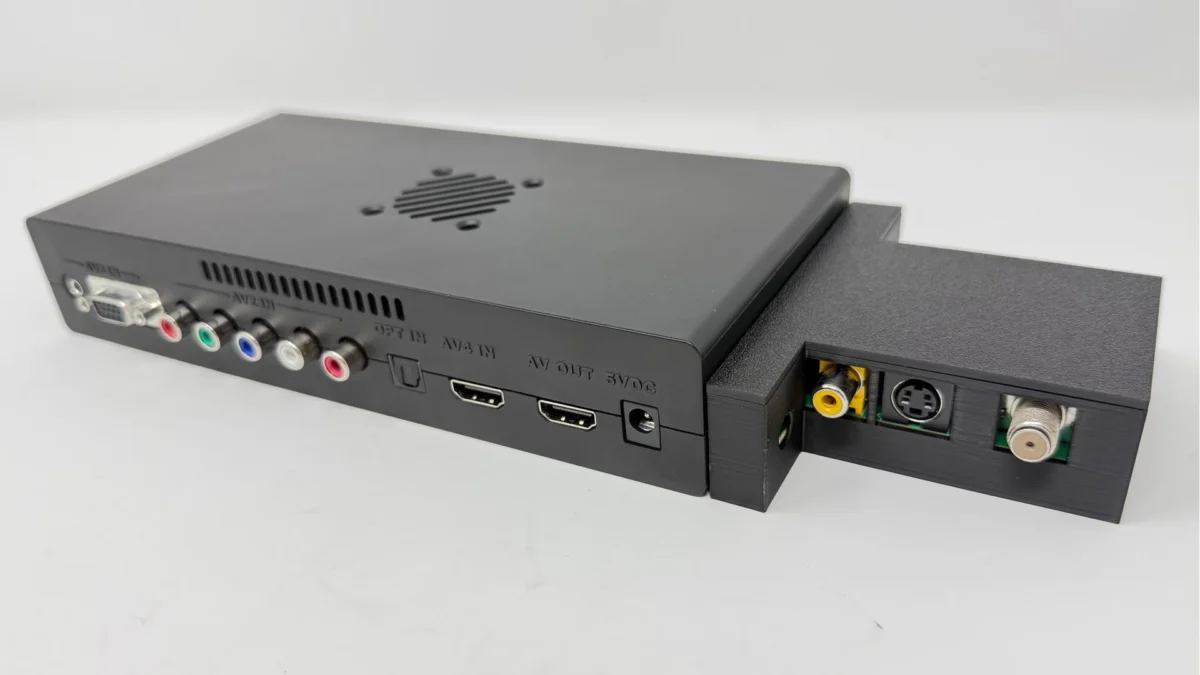
The retro gaming community is abuzz following the release of firmware v1.21 for the original Open Source Scan Converter (OSSC), a pivotal update from developer Markus (marqs85) that finalizes crucial features like Lumacode support and resolves long-standing issues with the SD profile save/load functionality. This development, coupled with an updated OSSC Profile Creator by Paulb-NL, signifies a major step forward, enabling users with the latest OSSC v1.8 motherboard revision—or those who have performed the necessary hardware modification—to fully leverage the device’s advanced capabilities and significantly enhance their classic gaming experience on modern displays.
The OSSC: A Cornerstone of Retro Gaming Preservation
To understand the profound impact of this update, it is essential to appreciate the OSSC’s role within the retro gaming landscape. The OSSC is a high-quality, open-source video processor designed to take analog video signals from vintage game consoles and home computers, digitize them, and then upscale them to modern digital display resolutions (like 480p, 720p, 1080p, and even 1200p or 1440p line-doubled modes) via an HDMI output. Unlike many commercial upscalers, the OSSC is celebrated for its near-zero input lag, a critical factor for competitive or rhythm-based retro games where timing is paramount. Its open-source nature has fostered a vibrant community of developers and users who continuously refine its capabilities, making it a cornerstone device for enthusiasts dedicated to preserving and enjoying classic games with optimal fidelity on contemporary televisions and monitors. Before devices like the OSSC, retro gamers often faced compromises: either playing on old CRT televisions, which are increasingly difficult to maintain and integrate into modern setups, or enduring the input lag and often poor image quality produced by standard TV upscalers. The OSSC bridged this gap, offering a pristine, lag-free solution that respects the original aspect ratios and pixel structures of classic systems.
A Chronology of Innovation and Refinement
The journey to firmware v1.21 has been a testament to continuous development and community collaboration. Since its initial release, the OSSC has undergone numerous firmware iterations, each adding features, improving compatibility, and refining performance. Early versions of the firmware, such as v1.0, laid the groundwork, but as the retro gaming scene evolved and new challenges emerged (e.g., specific console timings, complex video modes), the OSSC hardware and software had to adapt.
A significant milestone arrived with firmware v1.20, which introduced a host of advanced functionalities, including expanded video mode support and improved processing capabilities, many of which were ported from the more powerful OSSC Pro project. However, fully harnessing these features often necessitated a hardware upgrade. The OSSC v1.8 motherboard revision was developed to provide the necessary internal components and robust signal paths to support these complex operations reliably. For owners of earlier OSSC units, a specific hardware modification became available, allowing them to upgrade their devices to v1.8 specifications without purchasing a new unit. This commitment to backward compatibility, even through a physical mod, underscores the developer’s dedication to the existing user base.
The development of Lumacode support has been a gradual process, driven by community feedback regarding specific consoles known for challenging video output. Its full integration and stabilization in v1.21 represent the culmination of considerable effort to address these long-standing issues. Similarly, the reliability of SD card profile management has been a recurring theme in user discussions, making its definitive fix in this release a welcome development for all OSSC users.
Deep Dive into Firmware v1.21: Lumacode and Profile Management
The two headline features of firmware v1.21—finalized Lumacode support and the rectified SD profile save/load function—address critical aspects of the OSSC user experience.
Lumacode Support Explained: Lumacode is a specialized sync detection algorithm designed to improve signal stability and picture quality, particularly for consoles that exhibit challenging or non-standard analog video output. Historically, some consoles, such as the Sony PlayStation 2, Sega Saturn, and certain arcade boards, could produce video signals with characteristics that would occasionally confuse standard sync detectors in upscalers, leading to dropped frames, horizontal tearing, or an unstable image. Lumacode works by intelligently analyzing the luminance (brightness) information within the video signal to more accurately determine sync timings, even when the dedicated sync signal is weak, noisy, or unconventional.
For users, the finalization of Lumacode support translates into:
- Enhanced Compatibility: A wider range of problematic consoles and arcade boards can now be displayed cleanly and stably via the OSSC.
- Improved Picture Quality: Reduction of visual artifacts, such as flickering, shimmering, or horizontal instability, which were previously a nuisance for certain inputs.
- More Robust Sync: A more resilient and consistent image, especially during rapid scene changes or when a game’s output fluctuates.
- Optimal Settings for Challenging Sources: Retro gaming enthusiasts can now achieve previously unattainable levels of clarity and stability from some of their most cherished, yet technically demanding, systems.
Rectified SD Profile Save/Load Feature: The ability to save and load custom profiles from a MicroSD card is one of the OSSC’s most powerful features. It allows users to create and store optimized settings (e.g., specific line multiplication modes, sampling phases, video filters) for each console, game, or even individual display. Prior to v1.21, some users reported inconsistencies or outright failures when attempting to save or load these profiles, leading to frustration and the need to manually reconfigure settings. The fix in v1.21 ensures that:

- Reliable Configuration Storage: Users can confidently save their meticulously tuned settings without fear of corruption or loss.
- Seamless Switching: Switching between different consoles or preferred display modes becomes instantaneous, enhancing the overall user experience.
- Community Sharing: Reliable profile management facilitates the sharing of optimized settings within the community, allowing newcomers to benefit from the expertise of experienced users without extensive trial and error.
- Simplified Setup: Reduces the barrier to entry for new users, making the OSSC more approachable.
The Indispensable OSSC Profile Creator by Paulb-NL
Complementing Markus’s firmware update is the updated OSSC Profile Creator developed by Paulb-NL. This web-based utility is an invaluable tool for OSSC users, simplifying the otherwise complex process of configuring the device’s myriad settings. The OSSC, with its extensive array of options, can be daunting for new users. The Profile Creator provides a graphical user interface (GUI) that abstracts much of this complexity, allowing users to intuitively adjust parameters, visualize their impact, and generate .bin profile files that can be loaded onto the OSSC.
The significance of Paulb-NL’s update lies in its compatibility with firmware v1.20 and up. This ensures that users can create and manage profiles that fully leverage the latest features, including the intricacies of Lumacode and the expanded video modes. Crucially, the tool also facilitates the import and conversion of older profiles (e.g., those created for v0.89 firmware) to the new v1.20+ format. This conversion capability is vital because firmware updates can sometimes alter the underlying structure or interpretation of profile settings, rendering older profiles incompatible. The manual conversion of widely respected profile sets, such as the FirebrandX v0.89 profiles, into the v1.20 format via Paulb-NL’s site, provides an excellent starting point for users who have just updated their OSSC. This community-driven effort significantly reduces the time and effort required for users to get up and running with optimized settings.
Hardware Prerequisites and Upgrade Paths
It is critical for users to understand that the full benefits of firmware v1.21, particularly Lumacode support and advanced video processing, are contingent upon having compatible hardware. Specifically, users must either possess an OSSC unit with the v1.8 motherboard revision or have performed the necessary hardware modification on an older unit.
The v1.8 revision incorporates specific component upgrades and PCB layout improvements designed to handle the increased demands of the latest firmware features. These improvements might include more robust power delivery, enhanced signal integrity for cleaner video processing, or updated FPGA logic gates necessary for new algorithms. For owners of original OSSC units, the hardware mod involves soldering specific components or bridging certain traces on the circuit board. While not overly complex for individuals with basic soldering experience, it is considered an intermediate-level modification and requires precision to avoid damaging the device. Detailed guides and tutorials, such as those found on retrorgb.com, provide step-by-step instructions for those willing to undertake the mod. New OSSC units purchased from reputable vendors are typically the v1.8 revision, ensuring out-of-the-box compatibility with the latest firmware.
Streamlining the Firmware Update Process
Beyond the feature set, firmware v1.21 also highlights a significant improvement in the update process itself for OSSC users. For those currently on firmware v1.19 or older, the initial update to v1.20 (or directly to v1.21) still requires the traditional method: flashing a MicroSD card with the firmware .bin file and initiating the update via the OSSC’s menu. This foundational update also necessitates formatting the MicroSD card to FAT32 or exFAT, a change introduced with v1.20 to align with the OSSC Pro’s file system capabilities, offering better compatibility with larger cards and potentially faster read/write speeds.
However, a major convenience factor for all subsequent updates, including future revisions beyond v1.21, is the streamlined process. Once an OSSC is running v1.20 or newer, updating the firmware is as simple as dropping the latest .bin file into a specifically designated folder labeled "fw" on the root of the MicroSD card. The update can then be executed directly from the OSSC’s menu. This "drop-in" method significantly reduces friction for users, encouraging more frequent updates and ensuring that the community remains current with the latest enhancements and bug fixes. Furthermore, with the stability brought by v1.21, subsequent firmware updates are less likely to necessitate wholesale profile changes, unless entirely new features are introduced that fundamentally alter how profiles are structured. This contributes to a more stable and user-friendly ecosystem.
Community Reception and Broader Implications
The release of firmware v1.21 has been met with considerable enthusiasm across retro gaming forums, Discord servers, and social media platforms. The finalization of Lumacode support, in particular, addresses a long-standing desire within the community for improved compatibility with notoriously difficult consoles. Developer Markus’s dedication to refining and stabilizing the OSSC, even as newer devices like the OSSC Pro emerge, reinforces the enduring value of the original unit. Paulb-NL’s continuous work on the Profile Creator is similarly lauded, demonstrating the strength of the open-source model where community contributions directly enhance the user experience.
The implications of this update extend beyond mere technical improvements. It reinforces the OSSC’s position as a robust and future-proof solution for retro gaming. By continually adding features, improving compatibility, and streamlining the user experience, the OSSC ecosystem contributes significantly to the ongoing effort of video game preservation. It ensures that classic titles, designed for a bygone era of analog displays, can be enjoyed by contemporary audiences with a level of fidelity and responsiveness that rivals, and in some cases surpasses, their original presentation. This commitment to quality and community-driven development helps to democratize high-end retro gaming, making advanced visual enhancement accessible to a broader audience. The OSSC remains a testament to what can be achieved through dedicated open-source development, proving that even in a rapidly evolving tech landscape, specialized, community-supported hardware can maintain its relevance and critical role.
In conclusion, firmware v1.21 for the original OSSC, alongside the updated Profile Creator, marks a significant moment for retro gaming. It represents the culmination of sustained development efforts, delivering finalized features and critical fixes that enhance compatibility, improve image quality, and streamline the user experience. For enthusiasts committed to experiencing classic games at their best, this update solidifies the OSSC’s status as an indispensable piece of their retro gaming arsenal, ensuring that the rich history of video games can be celebrated with unparalleled visual fidelity on modern displays.