 Vera Clarissa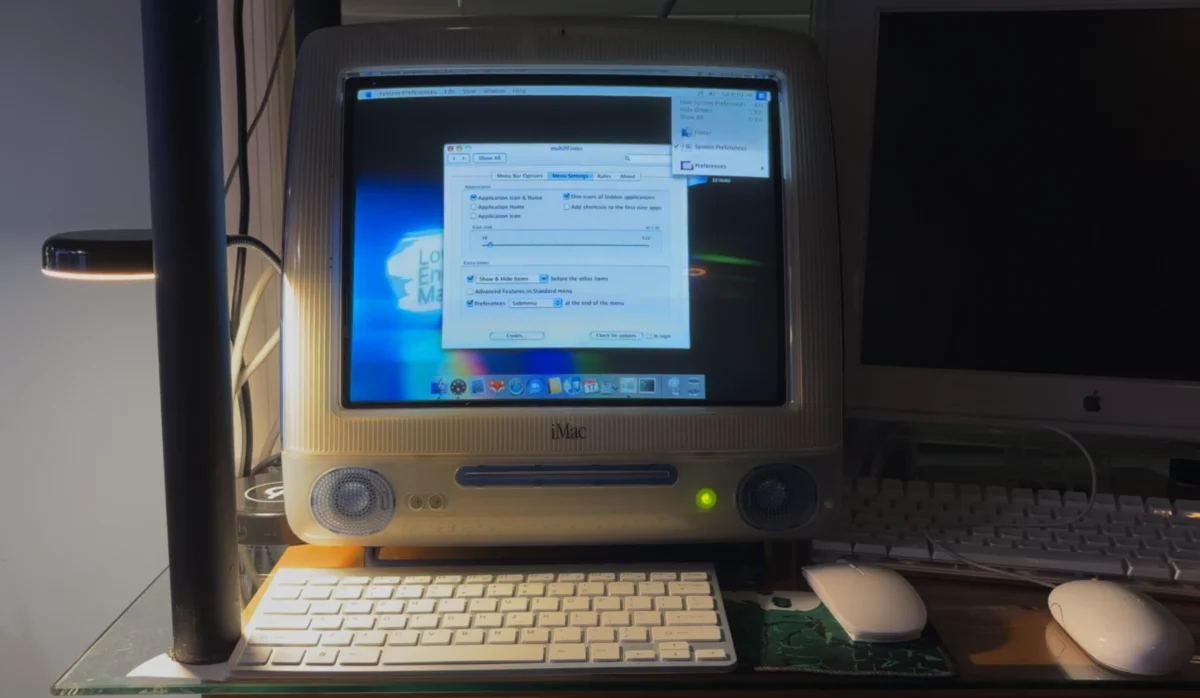
The release of MultiXFinder v0.5 marks a significant milestone in the preservation of classic macOS utility design, bridging the gap between legacy user interface paradigms and contemporary Apple Silicon architecture. This latest iteration, developed by the maintainer who assumed control of the x-asm project in early 2009, represents a complete rewrite of the software. By abandoning the legacy Assembly-based architecture of its predecessors in favor of a modern codebase, MultiXFinder v0.5 ensures long-term compatibility for users running macOS 10.11 El Capitan through the latest versions of macOS on both Intel-based and Apple Silicon-powered hardware.

The Evolution of a Classic Interface Utility
The original concept behind MultiXFinder was rooted in the classic Mac OS era, where the menu bar served as the primary nexus for application management and navigation. As Apple transitioned to Mac OS X and eventually to the modern macOS environment, the reliance on the Dock and Spotlight search became the default workflow for most users. However, for power users and those managing limited screen real estate on smaller displays—such as the iconic 1024 x 768 CRT screens of the iMac G3—the ability to manage applications directly from the menu bar remained a highly efficient, lightweight alternative.
The project’s history is a study in long-term software stewardship. Following the acquisition of the x-asm codebase in 2009, the current maintainer has worked to keep the utility functional through successive iterations of the macOS kernel. The transition from the original Assembly language to a modern, cross-architecture compatible language represents the most significant technical shift in the tool’s seventeen-year history. This transition was necessary to bypass the limitations imposed by Apple’s evolving security protocols and the architectural leap from x86_64 to ARM64 (Apple Silicon).

Technical Implementation and User Experience
MultiXFinder v0.5 functions as a lightweight menu bar application switcher. Its primary utility lies in its ability to offer an "always-on" navigation point that does not require the overhead or the intrusive animation sequences associated with the macOS Dock. By moving the application-switching interface to the top of the display, users can maintain focus on their active window without the distraction of a hidden dock appearing or disappearing during cursor movement.
One of the standout features of the v0.5 release is its persistent icon placement, which is intelligently tied to the active display. In multi-monitor setups, this provides an immediate visual indicator of which screen is currently in focus, a feature that significantly improves workflow efficiency for users who manage complex, multi-display workstations. Furthermore, the application includes customization options for its display area, including dark and light highlighting, which aids visibility on varied display hardware—including modern VA (Vertical Alignment) LED-backlit panels that may suffer from color shifting when viewed at extreme angles.

Compatibility and Legacy Support
The software’s reach remains expansive. By maintaining compatibility with macOS 10.11 El Capitan, the developer has ensured that users with older, "high-end" Intel Macs—such as the Mac Pro 2,1—can continue to utilize the software alongside users of the latest M4-series Mac mini hardware. This dual-capability is a rarity in modern software development, where developers frequently drop support for operating systems older than three or four years.
For users operating on legacy hardware, such as the 400 MHz Indigo FireWire Summer 2000 iMac G3, MultiXFinder provides a practical performance advantage. On such systems, reducing the load on the GPU and memory by hiding the Dock can lead to a more responsive desktop experience. Even on these vintage machines, the utility serves as a functional replacement for the Spotlight icon, effectively replicating the behavior that many users grew accustomed to during the Mac OS X Tiger era.

Analysis of the "Low-End" Computing Ecosystem
The continued development of tools like MultiXFinder highlights a robust secondary market for aging Apple hardware. Within the "Low-End Mac" community, the goal is often to extend the useful life of computers that have been officially deprecated by Apple. The ability to run modern web browsers like PowerFox on a G3 iMac with 512 MB of RAM and an 8 MB ATI Rage 128 Pro GPU is a testament to both the optimization of these legacy utilities and the enduring efficiency of the core Mac OS X architecture.
From a broader perspective, the implication of this update is that the desktop interface is not a monolith. While Apple continues to iterate on the "standard" way a user interacts with the Finder and the Dock, third-party developers continue to find value in providing alternative input methods. The fact that an app that works on a 2006-era Mac Pro can also function on a 2026-era M4 Mac mini suggests that the foundational principles of macOS UI design have remained consistent enough for such utilities to bridge two decades of hardware evolution.

Future Implications and User Adoption
The release of v0.5 is expected to be well-received by the enthusiast community. By streamlining the installation process—moving from a traditional, sometimes cumbersome installation package to a simple drag-and-drop mechanism for the Applications folder—the developer has removed a significant barrier to entry for casual users.
Industry observers note that as Apple’s hardware becomes more integrated, the ability to customize the UI is becoming increasingly restricted by System Integrity Protection (SIP) and other security measures. Utilities that manage to navigate these restrictions while offering high-utility, low-footprint functionality are likely to see increased demand. MultiXFinder occupies a unique space: it is not a system-level hack that risks stability, but a user-level application that respects the boundaries of the macOS environment.

Conclusion
As the computing world moves toward more restrictive, cloud-dependent, and heavily abstracted user interfaces, the preservation of classic, performant utilities like MultiXFinder serves as a vital component of the digital ecosystem. The commitment shown by the developer to maintain this tool across multiple generations of Mac architecture—from the PowerPC days to the current Apple Silicon era—is a significant contribution to the longevity of the Mac platform.
For the professional, the hobbyist, and the collector alike, the update to MultiXFinder v0.5 represents more than just a software patch. It is an affirmation that efficiency and user-choice in interface design remain relevant, regardless of the underlying processor architecture or the age of the machine. By maintaining this level of support, the developer has ensured that the "classic" Mac experience remains accessible, even as the hardware that powers it continues to advance at an unprecedented pace. The tool remains a testament to the fact that, in the world of computing, the most effective interfaces are often the ones that have been refined through decades of thoughtful, iterative development.