Farhan hamdan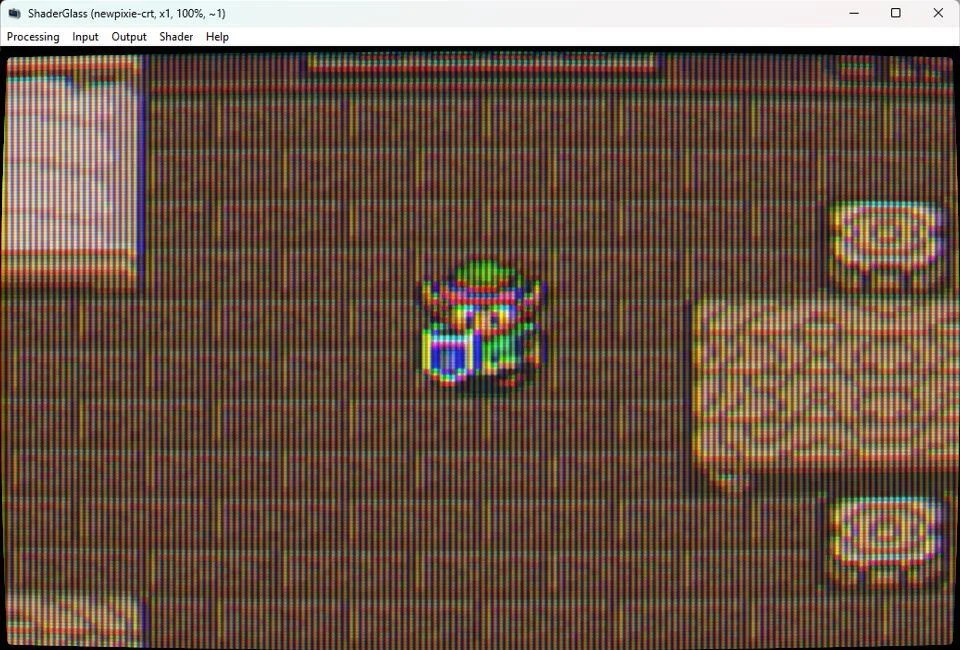
The digital landscape of retro gaming has seen a significant advancement with the recent release of a new version of ShaderGlass, a specialized software developed by mausimus. This update delivers crucial enhancements, including a default full framerate operation, improved compatibility for Linux users via Wine, and an expanded library of sophisticated CRT-like shaders. Designed as a lightweight, portable application, ShaderGlass functions as a system-wide overlay, applying authentic retro display aesthetics to virtually any program running on a personal computer. The software remains entirely free, requiring no formal installation—users simply extract a compressed file and execute the program, making it an indispensable tool for enthusiasts seeking to replicate the visual fidelity of cathode ray tube (CRT) displays on modern flat-panel monitors.
The Pursuit of Authenticity: Understanding CRT Emulation
The allure of retro gaming often extends beyond gameplay mechanics and nostalgic content; it deeply intertwines with the visual presentation inherent to the original hardware. For decades, CRT televisions and monitors were the standard display technology, shaping the visual characteristics of countless classic video games. These displays possessed unique properties that modern LCDs, LEDs, and OLEDs fundamentally lack. Key among these are scanlines, the visible horizontal lines that make up the image, which were often intentionally leveraged by game artists to create specific visual effects, depth, and anti-aliasing. Beyond scanlines, CRTs featured distinct phosphor dot patterns (such as aperture grille, slot mask, and shadow mask), inherent motion blur due to phosphor decay, and a natural curvature of the screen, all contributing to a specific "feel" that is often lost when games are displayed on contemporary, pixel-perfect flat panels.
The transition from CRT to flat-panel displays, while offering advantages like higher resolution, reduced flicker, and significantly thinner profiles, inadvertently created a visual disconnect for retro gaming. Modern displays render pixels in a grid-like fashion, often at resolutions far exceeding original game assets, leading to sharp, blocky edges that were never intended by the developers. This stark presentation can detract from the intended artistic vision and overall nostalgic experience. Consequently, a dedicated movement within the retro gaming community emerged, focused on software-based emulation of CRT characteristics to bridge this visual gap. ShaderGlass stands as a prominent solution in this ongoing effort, providing a flexible and accessible method to reintroduce these authentic visual cues.
ShaderGlass: A Deep Dive into the Latest Release
The latest iteration of ShaderGlass represents a substantial leap forward in its functionality and user experience. The most notable improvement is its default operation at a full framerate. Earlier versions, or some configurations, might have introduced minor latency or frame inconsistencies, which can be particularly disruptive in fast-paced retro titles where precise timing is paramount. Operating at a full framerate ensures that the visual effects are applied smoothly and in sync with the underlying application, preserving the fluidity of gameplay and video content. This optimization is crucial for maintaining the responsive feel characteristic of original CRT setups.
Another significant enhancement is the improved support for Linux operating systems, achieved through better integration with Wine, the compatibility layer that allows Windows applications to run on Linux. This development broadens the accessibility of ShaderGlass to a wider demographic of retro gaming enthusiasts who prefer or exclusively use Linux, reflecting a growing recognition of the diverse computing environments within the emulation community. The seamless experience on Linux environments ensures that a larger segment of users can benefit from the sophisticated visual enhancements offered by the software.
Furthermore, the new version boasts an expanded collection of shaders. Shaders are small programs that run on a graphics processing unit (GPU) to apply visual effects to images. In the context of CRT emulation, these shaders meticulously reconstruct the visual artifacts of old displays, ranging from intricate scanline patterns and realistic phosphor textures (simulating aperture grille, slot mask, or shadow mask CRTs) to subtle curvature, bloom effects, and even color bleeding that mimics the analog signal chain. The inclusion of more shaders provides users with a richer palette of visual options, allowing for greater customization and the ability to closely match the aesthetic of specific CRT models or personal preferences. This expanded library underscores the developer’s commitment to providing a comprehensive and versatile emulation tool.
The design philosophy behind ShaderGlass emphasizes accessibility and portability. Being completely free of charge eliminates any financial barrier to entry, aligning with the open-source ethos prevalent in many emulation projects. Its "no installation" requirement is a significant convenience; users merely extract a ZIP file to a folder and can run the executable directly. This portability means it can be easily stored on a USB drive and used across different PCs without leaving residual files or altering system registries, making it ideal for gamers who utilize multiple machines or prefer clean, self-contained applications.
Beyond its core enhancements, ShaderGlass also offers practical user experience features. It supports both fullscreen and windowed modes, allowing users to apply shaders to dedicated gaming applications or integrate them into a multi-tasking desktop environment. For users who might find the sheer volume of available shaders overwhelming, the software includes a favorites list feature. This allows users to curate a personalized selection of preferred shaders, making it easy to switch between specific visual styles without navigating through the entire library. This thoughtful design element significantly streamlines the customization process, catering to individual aesthetic preferences.
The Developer Behind the Pixels: Mausimus and the Retro Emulation Landscape
The developer, known as mausimus, has consistently contributed to the retro gaming community through innovative software solutions. ShaderGlass is not an isolated project but rather part of a broader portfolio that includes other notable tools like ShaderBeam. ShaderBeam, another free Windows application by mausimus, focuses on CRT beam emulation, specifically simulating the complex characteristics of a CRT’s electron beam and its interaction with the phosphor screen. Together, ShaderGlass and ShaderBeam exemplify mausimus’s dedication to providing high-quality, accessible software for enhancing the retro emulation experience on modern PCs. Their work contributes significantly to the open-source ecosystem, which thrives on community contributions and the shared goal of preserving and enhancing classic gaming experiences.

The broader retro emulation landscape is a vibrant and collaborative space, driven by passionate individuals and communities. Projects like RetroArch, a powerful frontend for various emulators, have popularized the use of shaders, integrating extensive shader libraries that can be applied to a multitude of emulated systems. However, ShaderGlass occupies a unique niche by operating as a system-wide overlay rather than being tied to a specific emulator. This distinction allows it to enhance the visual fidelity of any program, including standalone emulators, modern games with retro art styles, or even video playback, offering a more universal application of CRT aesthetics. This flexibility underscores its value as a distinct and complementary tool within the retro enthusiast’s toolkit.
The Technical Nuances of CRT Shaders
The art and science of CRT shaders involve simulating complex optical and electronic phenomena. Different types of shaders aim to replicate various aspects of CRT displays:
- Scanline Shaders: These are perhaps the most fundamental. They create the distinct dark lines between active scanlines, which were inherent to interlaced or progressive scan video on CRTs. The intensity, thickness, and curvature of these simulated scanlines can be adjusted to mimic different display types and resolutions.
- Phosphor Dot Pattern Shaders: These simulate the microscopic arrangement of red, green, and blue phosphor dots (or stripes) on the screen. Common patterns include:
- Aperture Grille (Trinitron-style): Characterized by vertical stripes, often seen on Sony Trinitron displays, known for their sharp, vibrant images.
- Slot Mask: A hybrid pattern with rectangular holes, offering a balance between sharpness and softness.
- Shadow Mask: A pattern of circular dots, typically found on older, consumer-grade CRTs, producing a softer image.
- These shaders are crucial for replicating the fine texture and color blending of CRTs.
- Curvature Shaders: Many CRTs, especially older models, had visibly curved screens. Curvature shaders introduce this subtle distortion, further enhancing the illusion of a physical CRT.
- Bloom and Halation Shaders: These simulate the way light from bright pixels "bleeds" into adjacent darker areas and the subtle glow around bright elements, a characteristic of CRTs due to the spreading of electron beams and internal reflections.
- Color Bleeding and NTSC Artifacts: Some shaders go further to emulate the artifacts of analog video signals, such as color bleeding (chroma blur) and dither patterns that result from the limited color palette and resolution of early consoles, which were often exploited by game artists for pseudo-transparency or richer color blends.
The computational demands of these sophisticated shaders can vary. While modern GPUs are highly efficient at parallel processing, complex multi-pass shaders that combine several effects can still impact performance. The ShaderGlass update’s focus on "full framerate" indicates optimizations to ensure these visual enhancements do not introduce noticeable lag or frame drops, even with the most elaborate shader configurations. This optimization is critical, as any perceptible delay or stutter can ruin the illusion of authenticity and the enjoyment of gameplay. The developer’s acknowledgment that "CRT emulation doesn’t even look right over compressed video" highlights the subtle, often nuanced nature of these effects and the importance of experiencing them firsthand on a native display, rather than through secondary, compressed media.
Historical Context: The Evolution of Retro Gaming Emulation
The journey of retro gaming emulation began in the late 1990s and early 2000s, driven by enthusiasts seeking to play classic games on modern hardware. Early emulators focused primarily on functional replication of hardware and software, prioritizing game compatibility and performance. Visual fidelity, particularly the nuanced characteristics of CRTs, was often a secondary concern. As computing power increased, so did the ambition of emulators. The introduction of graphics processing unit (GPU) shaders in the mid-2000s revolutionized visual emulation. Initially used for basic upscaling and filtering, shaders quickly evolved to tackle more complex tasks, including CRT simulation.
Projects like MAME (Multiple Arcade Machine Emulator) and later RetroArch became pioneers in integrating advanced shader pipelines. Developers meticulously studied the optical properties of CRTs, reverse-engineering the visual effects to create algorithms that could replicate them digitally. This led to the development of sophisticated shader packs like the "CRT-Geom" family, "xBRZ" filters, and various "scanline" shaders, which became staples in the emulation community. ShaderGlass distinguishes itself by offering these capabilities as a standalone, system-wide solution, rather than being confined within a specific emulator. This architectural choice provides unparalleled flexibility, allowing users to apply these effects to a broader spectrum of applications, including those not natively supported by shader-enabled emulators. This evolution marks a shift from mere functional emulation to a holistic pursuit of authentic sensory experiences.
Implications for the Retro Gaming Community
The continued development and refinement of tools like ShaderGlass carry significant implications for the retro gaming community:
- Enhanced Accessibility: ShaderGlass makes high-quality CRT emulation accessible to a wider audience. Not everyone has the space, budget, or technical know-how to acquire, maintain, and connect original CRT televisions. Software solutions offer a convenient and cost-effective alternative, allowing more enthusiasts to experience classic games with their intended visual aesthetic on their existing modern displays. This democratizes the authentic retro experience.
- Preservation Efforts: Beyond mere entertainment, retro gaming is an act of digital preservation. Preserving the visual fidelity of classic games is as crucial as preserving their code and gameplay. By accurately replicating the display characteristics, ShaderGlass contributes to a more faithful and complete preservation of gaming history, ensuring that future generations can experience these titles closer to their original form.
- Bridging the Gap: For many, the choice between original hardware and emulation is a contentious one. ShaderGlass helps bridge this gap by offering a compelling software-based solution that significantly improves the visual authenticity of emulation. While it may never perfectly replicate the analog nuances of a physical CRT, it provides a remarkably convincing and enjoyable alternative, especially when original CRTs are impractical, scarce, or expensive.
- Community Engagement and Innovation: The open-source nature of projects like ShaderGlass fosters community engagement. Users can contribute shaders, report bugs, and provide feedback, driving continuous innovation. The developer’s responsiveness to community needs, as evidenced by improved Linux support and expanded shader libraries, ensures the tool remains relevant and cutting-edge. This collaborative spirit is a cornerstone of the retro gaming movement.
The ongoing debate within the community regarding hardware versus software emulation continues to evolve. While dedicated enthusiasts may always prefer original CRTs for their inherent characteristics like zero input lag and specific analog qualities, the practical realities of space, maintenance, and availability make software solutions increasingly vital. ShaderGlass positions itself as a robust and elegant answer to the demand for high-quality visual emulation, offering a pragmatic yet visually stunning compromise.
Looking Ahead: The Future of Display Emulation
The trajectory of display emulation suggests a future where software tools will continue to grow in sophistication and integration. We can anticipate further advancements in shader technology, potentially leveraging machine learning or artificial intelligence to more accurately model complex optical phenomena. The integration of such tools directly into operating systems or display drivers could become more common, offering a seamless and universal application of retro aesthetics. The persistent demand for authentic experiences, coupled with the ongoing innovation from developers like mausimus, ensures that the pursuit of perfect CRT replication in software will remain a dynamic and exciting field. As display technologies evolve, so too will the methods to intelligently emulate the cherished visual characteristics of the past, allowing the enduring appeal of retro aesthetics to thrive for generations to come. The latest ShaderGlass update serves as a powerful testament to this ongoing commitment and innovation.