Edi Durjana
RetroArch, the popular open-source frontend for emulators, game engines, and media players, has unveiled a revolutionary new shader designed to dramatically improve motion clarity on modern high-refresh-rate displays. This innovative solution, a collaborative effort between display science pioneer Mark Rejhon of BlurBusters and acclaimed graphics programmer Timothy Lottes (creator of the original FXAA and crt-lottes shaders), promises to deliver an authentic, low-persistence visual experience without the inherent drawbacks of conventional Black-Frame Insertion (BFI) techniques. The development leverages RetroArch’s recently implemented "subframe" shader capabilities, allowing for rendering operations at multiples of the standard content framerate, marking a significant advancement in display emulation and visual fidelity for classic games.
This breakthrough is particularly vital for enthusiasts of retro gaming, where the distinct visual characteristics of Cathode Ray Tube (CRT) displays—known for their instantaneous pixel response and inherent motion clarity—are highly sought after. Modern Liquid Crystal Display (LCD) and Organic Light-Emitting Diode (OLED) panels, while offering superior resolution, color reproduction, and brightness, fundamentally operate on a "sample-and-hold" principle. This means that each frame is displayed continuously until the next frame is ready, leading to perceived motion blur, even at very high refresh rates. This phenomenon, often referred to as display persistence, is a major impediment to accurately replicating the feel of classic arcade and console gaming on contemporary hardware.
The Enduring Challenge of Motion Blur on Modern Displays
For decades, CRT displays dominated the gaming landscape. Their operational principle involved an electron beam rapidly scanning across the screen, illuminating phosphors for a fleeting moment before moving on. This "impulse" display characteristic meant that each pixel was only briefly illuminated, and the human eye perceived distinct, sharp images in motion. When an object moved across a CRT, the eye could smoothly track its position, resulting in exceptional motion clarity.
The transition to flat-panel displays, particularly LCDs and later OLEDs, introduced a new set of visual characteristics. While these displays offered numerous advantages—thinner profiles, lighter weight, higher resolutions, and reduced power consumption—they fundamentally changed how images were presented. Unlike CRTs, which essentially "flash" an image, modern displays "hold" each frame for the entire duration of the refresh cycle. If a game runs at 60 frames per second (fps) on a 60 Hz display, each frame is displayed for approximately 16.67 milliseconds. During this time, the image remains static on the screen, even as the object it depicts is conceptually moving. As the eye tracks the moving object across the static image, the brain integrates the slightly different positions of the object from successive frames, resulting in a smeared or blurred appearance. This "sample-and-hold" motion blur is a perceptual phenomenon inherent to how these displays operate and how the human visual system processes movement.
To combat this, display manufacturers and software developers have explored various techniques. One of the most common has been Black-Frame Insertion (BFI). BFI attempts to mimic the impulse nature of CRTs by inserting a black frame between each rendered game frame. For example, on a 120 Hz display, a 60 fps game might render a game frame, then a black frame, then the next game frame, and so on. By momentarily turning off the display, BFI reduces the overall display persistence, effectively "resetting" the eye’s perception and significantly improving perceived motion clarity.
However, BFI comes with significant trade-offs. The most immediate and noticeable drawback is a drastic reduction in perceived brightness, often by 50% or more, as the display is literally showing black for half the time. This can make games appear dim and less vibrant. Furthermore, the rapid alternation between bright game frames and dark black frames can introduce noticeable flicker, which can be fatiguing for some users and may even trigger discomfort or headaches. On certain panel types, particularly some LCDs, the rapid on/off cycling can also contribute to image persistence or "burn-in" concerns, although this risk is generally lower on modern, well-designed displays and almost non-existent on OLEDs. These limitations have prevented BFI from becoming a universally adopted solution, leaving a persistent gap in achieving true CRT-like motion clarity on modern hardware.
A Collaboration of Display Experts: Rejhon and Lottes
The development of this new shader is the product of a powerful collaboration between two figures highly respected in the fields of display technology and graphics programming.
Mark Rejhon, founder of BlurBusters (blurbusters.com), has dedicated his career to researching and advocating for high refresh rate, low persistence displays. BlurBusters is widely recognized as a leading authority on display science, offering in-depth analysis of monitor performance, ghosting, input lag, and motion blur. Rejhon’s work has been instrumental in educating both consumers and industry professionals about the importance of motion clarity and the technical nuances that differentiate various display technologies. His long-standing goal has been to bridge the gap between the pristine motion of CRT displays and the modern flat-panel experience, making him uniquely qualified to spearhead a solution to this long-standing problem. His expertise provides the deep understanding of human perception and display physics necessary to devise an effective strategy.
Timothy Lottes is a renowned graphics programmer, best known for creating the Fast Approximate Anti-Aliasing (FXAA) shader, a widely adopted post-processing technique used to smooth jagged edges in video games with minimal performance impact. Lottes also developed the popular "crt-lottes" shaders, which are highly regarded within the retro gaming community for their authentic CRT scanline and curvature emulation. His extensive background in shader development and real-time graphics algorithms makes him the ideal partner to translate complex display science principles into efficient and effective shader code that can run seamlessly within RetroArch. This partnership combines Rejhon’s theoretical and empirical knowledge of display behavior with Lottes’ practical mastery of shader implementation, creating a formidable team to tackle the challenges of motion clarity.
RetroArch’s Subframe Capabilities: The Enabling Technology
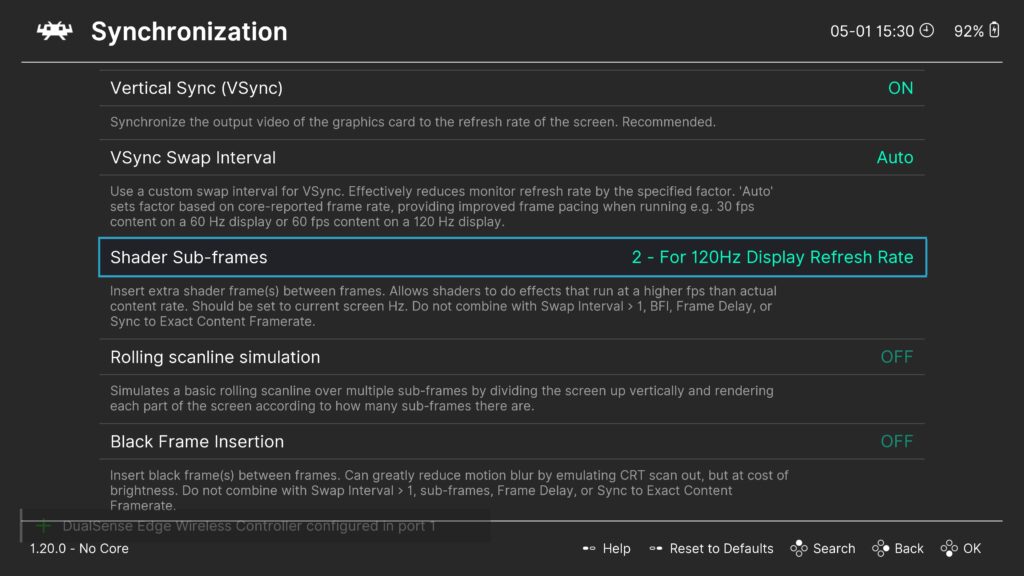
The cornerstone of this new shader’s functionality lies in RetroArch’s recently introduced "subframe" shader capabilities. Traditionally, shaders in RetroArch (and most rendering pipelines) operate on a frame-by-frame basis. A shader receives a fully rendered image frame and applies post-processing effects before it is sent to the display. This limits the shader’s ability to manipulate temporal aspects of the image beyond what can be inferred from consecutive frames.
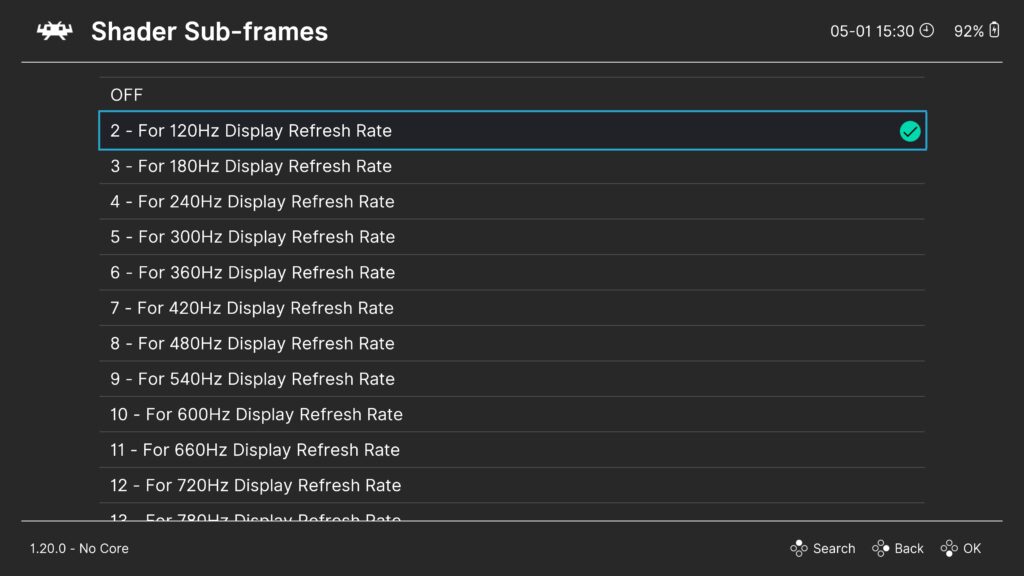
The "subframe" feature represents a paradigm shift. It allows shaders to operate at a frequency that is a multiple of the core content framerate. For instance, if a game runs at 60 fps, and the display operates at 120 Hz, RetroArch can now instruct the shader to execute twice for every game frame, effectively creating intermediate "subframes" that can be customized. This is a powerful new tool, as it provides the shader with a finer temporal granularity to work with, enabling it to insert or modify visual information between the primary game frames. This capability is crucial because it allows the shader to simulate display behaviors that occur at a sub-frame level, such as the rapid scanning of an electron beam across a CRT screen, which is far more nuanced than simply inserting a global black frame.
To utilize this advanced feature, users must ensure they are running RetroArch 1.20.0 or a more recent version (any nightly build will suffice). Previous versions lack the necessary infrastructure to support the Shader Sub-frames feature, which is fundamental to this new shader’s operation. This requirement underscores the cutting-edge nature of the implementation and RetroArch’s continuous evolution in providing sophisticated emulation tools.
The "CRT Beam Simulator" in Action: A Deeper Dive into the Mechanics
The new shader, referred to as "CRT beamracing" or "CRT beam simulator" within RetroArch’s presets, takes an entirely different approach to motion clarity than BFI. Instead of simply turning the screen black, it intelligently simulates the "rolling raster line" effect characteristic of CRT displays. In a CRT, the electron beam scans from the top left of the screen to the bottom right, illuminating pixels sequentially. This creates a brief, localized flash of light that moves down the screen. The new shader leverages RetroArch’s subframe capabilities to mimic this behavior on modern displays.
On a high-refresh-rate monitor (e.g., 120 Hz, 240 Hz), the shader can generate multiple subframes for each original game frame. Instead of displaying a full black frame, it generates intermediate subframes that progressively darken or dim portions of the screen, creating the illusion of a scanning beam. For example, if a 60 fps game is running on a 120 Hz display, the shader might display the full game frame, and then for the intermediate subframe, it could render a simulated "beam" effect that sweeps across the screen. This localized dimming or "raster line" creates an impulse-like effect that significantly reduces perceived persistence without the harshness of full-screen black frames. The effect is akin to how a camera with a fast shutter speed might capture a CRT screen, revealing the moving scanline.
This dynamic, localized persistence simulation is the key differentiator from traditional BFI. By only affecting a portion of the screen at any given moment, the overall brightness reduction is significantly less pronounced. The flicker associated with BFI is also largely eliminated because there isn’t a jarring full-screen on-off cycle, but rather a smoother, localized transition that mimics natural CRT behavior. The continuous, albeit localized, light output minimizes the discomfort often associated with BFI.
Key Advantages Over Conventional BFI
The "CRT Beam Simulator" shader offers several compelling advantages over traditional Black-Frame Insertion methods, making it a superior solution for enhancing motion clarity:
-
Reduced Brightness Loss: Unlike BFI, which dims the entire screen by inserting full black frames, this shader employs a localized, dynamic dimming effect that simulates a scanning raster line. This means that at any given moment, a significant portion of the screen remains illuminated, resulting in a far less drastic reduction in overall perceived brightness. Users can enjoy improved motion clarity without sacrificing the vibrancy and brightness of their games.
-
Elimination of Flicker: Traditional BFI’s rapid alternation between bright game frames and completely black frames can cause noticeable and often fatiguing flicker. The new shader avoids this by utilizing a smoother, simulated scanning effect. The localized and progressive nature of the "beam" simulation means there are no harsh, full-screen on/off cycles, thereby eliminating the flicker that often makes BFI uncomfortable for many users.
-
Mitigation of Image Persistence/Burn-in Risk: On certain flat-panel displays, particularly some older or less robust LCDs, the repeated voltage accumulation from the on/off flickering of BFI can contribute to image persistence or even, in extreme cases, accelerated wear. While OLED panels are generally unaffected by this specific mechanism, and modern displays have improved, the new shader’s approach significantly reduces this risk. By avoiding full-screen black frames and instead simulating a rolling raster, it minimizes the stress on the panel that traditional BFI might induce.
-
Enhanced Customization and Fine-Tuning: The shader includes robust runtime parameters that allow users to precisely tailor the visual output to their specific display and preferences. These include adjustments for gamma, which can be used to achieve a neutral image and eliminate any unusual dark lines that might appear. Furthermore, a critical parameter allows users to fine-tune the trade-off between brightness and motion clarity. For 120 Hz monitors operating with two subframes, a value of approximately 0.5 is often ideal, while 240 Hz monitors (utilizing four subframes) typically benefit from a value around 0.7. This level of control ensures optimal performance and user satisfaction.
-
Seamless Integration with Existing Shader Presets: A significant benefit for the RetroArch community is the shader’s modular design. It can be easily combined with other existing shader presets, such as popular CRT shaders (e.g., scanline shaders, curvature effects). Users can prepend this new "CRT Beam Simulator" to their favorite CRT presets without encountering compatibility issues, allowing them to achieve a comprehensive, highly authentic retro gaming visual experience that combines crisp motion with classic display aesthetics. Pre-made presets that utilize this shader can also be found under
shaders_slang/presets/crt-beam-simulator, simplifying the setup process for many users.
Implementation Guide and Display Specifics
For users eager to experience this enhanced motion clarity, the process within RetroArch is straightforward, provided the necessary prerequisites are met. A high-refresh-rate monitor (120 Hz or higher) is essential to leverage the subframe capabilities effectively.
Installation and Activation Steps:
- Update RetroArch: Ensure you are running RetroArch 1.20.0 or a newer nightly build.
- Load Content: Start any game or content in RetroArch.
- Open Quick Menu: While the content is running, open the RetroArch Quick Menu (usually F1 or your configured hotkey).
- Navigate to Shaders: Select "Shaders" from the Quick Menu.
- Enable Shaders: If not already enabled, toggle "Shaders ON" to ON.
- Load Shader Preset: Choose "Load Shader Preset."
- Browse to crt-beam-simulator: Navigate to
shaders_slang/presets/crt-beam-simulator/and select one of the pre-made presets, or load the base shader and combine it manually. - Apply Changes: After loading, select "Apply Changes" or "Save Core Preset" to make it permanent for the current core.
Once the shader is active, users will need to fine-tune it based on their specific display characteristics. The runtime parameters, accessible through the shader options in the Quick Menu, allow for adjustments to gamma and the brightness/motion clarity trade-off. As mentioned, a value of approximately 0.5 is a good starting point for 120 Hz monitors (with two subframes), while roughly 0.7 is often ideal for 240 Hz monitors (with four subframes). Experimentation is encouraged to find the perfect balance for individual preferences and display models.
It is also important to note that not all flat-panel monitors are equally susceptible to image persistence issues caused by flickering. OLED panels, for example, are generally immune due to their self-emissive nature, where pixels are either truly on or off without needing a backlight. Similarly, monitors running at odd integer multiples of 60 Hz, such as 180 Hz, may also exhibit different characteristics. For these specific displays, the shader includes a runtime parameter to disable the "cycle timing offset." This prevents the simulated raster line from rolling up the screen, which might be undesirable or unnecessary on displays less prone to certain artifacts. Additionally, a parameter is available to adjust the vertical position of the raster line, allowing users to place it in the least obtrusive spot for their particular setup.
For any issues encountered, Mr. Rejhon has provided an FAQ and troubleshooting guide on his GitHub repository: https://github.com/blurbusters/crt-beam-simulator/issues/4. Users can also seek assistance through RetroArch’s active support channels, including Discord, Reddit, and the official Libretro forums. Further insights into the technology are available via a detailed video from a well-regarded expert in display technologies, offering an external perspective on the shader’s capabilities and implications.
Broader Implications and the Future of Display Emulation
The introduction of the "CRT Beam Simulator" shader represents more than just an incremental update for RetroArch; it signifies a pivotal moment in the ongoing quest for display authenticity in emulation. By overcoming the long-standing limitations of BFI and leveraging sophisticated subframe rendering, this shader sets a new benchmark for motion clarity on modern displays.
For the retro gaming community, this means an unprecedented level of fidelity. The ability to experience classic titles with the crisp, low-persistence motion characteristic of their original CRT platforms, combined with the vibrant colors and sharpness of modern panels, bridges the gap between nostalgia and technological advancement. It enhances the immersive quality of retro games, allowing players to perceive fast-moving sprites and intricate pixel art with the clarity intended by their creators.
Beyond emulation, this development highlights the potential of software-level solutions to address fundamental hardware challenges. The collaboration between a display science expert and a shader programming virtuoso demonstrates how interdisciplinary approaches can yield truly innovative results. This could inspire further research into advanced display algorithms, potentially influencing future display technologies or driver-level optimizations that aim to deliver superior motion performance without compromising other visual attributes. The open-source nature of RetroArch ensures that this technology will be accessible and can serve as a foundation for future advancements by the community.
In conclusion, the "CRT Beam Simulator" shader is a testament to the continuous innovation within the RetroArch ecosystem and the broader retro gaming community. By meticulously simulating the nuanced characteristics of CRT displays through cutting-edge subframe rendering, Mark Rejhon and Timothy Lottes have delivered a transformative tool that significantly enhances motion clarity, effectively bringing the authentic visual experience of classic gaming to modern high-refresh-rate displays, free from the traditional compromises. This marks a new era for visual fidelity in emulation, promising a more immersive and true-to-original experience for enthusiasts worldwide.