 Farhan hamdan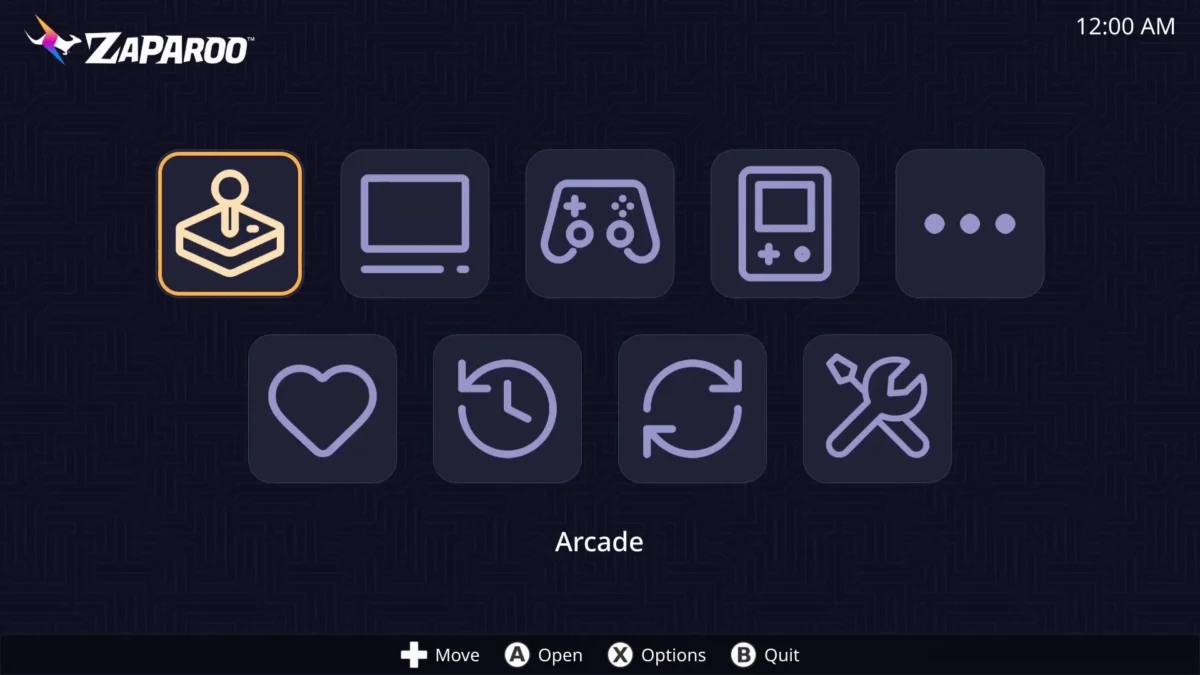
The MiSTer FPGA project, a cornerstone of hardware-accurate retro gaming emulation, has received a significant enhancement with the recent release of Zaparoo Frontend v1.2.0. Developed by Wizzo, this enriched Graphical User Interface (GUI) aims to transform the MiSTer experience, making it considerably more user-friendly and accessible for both seasoned enthusiasts and newcomers alike. The development marks a pivotal moment in the ongoing evolution of the MiSTer platform, addressing common user interface challenges and streamlining daily operations through intuitive design and robust functionality.
The MiSTer FPGA project, short for "MiSTer Field-Programmable Gate Array," stands as a monumental achievement in the realm of digital preservation and retro gaming. Unlike software-based emulators that run on general-purpose CPUs, MiSTer utilizes an FPGA chip to reconfigure its hardware circuitry to precisely mimic the original hardware of classic gaming consoles, arcade machines, and home computers. This hardware-level replication delivers unparalleled accuracy, minimal input lag, and a truly authentic experience that software emulation often struggles to achieve. Since its inception, the MiSTer project has fostered a vibrant, open-source community, with developers globally contributing "cores" – the digital blueprints that transform the FPGA into a specific retro system. From the NES and SNES to the Neo Geo and various arcade boards, the MiSTer ecosystem has grown exponentially, offering a comprehensive library of classic systems. However, this technical prowess has historically come with a learning curve, particularly concerning its default user interface.
While the standard MiSTer GUI is functional and effective for experienced users, its utilitarian design and text-based navigation can often present a barrier to entry for those less familiar with command-line interfaces or intricate system configurations. Users frequently navigate through nested menus, manually update system components, and rely on external scripts or tools for more advanced management tasks. This, while powerful, detracts from the seamless "plug-and-play" experience many modern users expect. The challenge has always been to marry the incredible accuracy and flexibility of the MiSTer hardware with an interface that is intuitive and welcoming, thereby broadening its appeal without compromising its core principles. The community has seen various attempts and supplementary tools designed to bridge this gap, but a comprehensive, deeply integrated solution has remained a sought-after innovation.
Zaparoo Frontend emerges as a direct response to this community need, offering a polished and streamlined graphical environment designed to elevate the user interaction with the MiSTer. Its core philosophy revolves around simplicity and efficiency, aiming to reduce the cognitive load on users by centralizing common tasks within an aesthetically pleasing and navigable interface. A key highlight of Zaparoo Frontend v1.2.0 is its versatile display compatibility. Recognizing the diverse preferences within the retro gaming community, Wizzo has engineered the GUI to function seamlessly across both High-Definition (HD) resolutions and traditional Cathode Ray Tube (CRT) displays. Dedicated modes have been meticulously crafted to optimize screen space utilization for each display type, ensuring crisp visuals and appropriate aspect ratios, whether connected to a modern LCD/OLED panel via HDMI or an authentic CRT monitor for that classic pixel-perfect look.
The development timeline for Zaparoo Frontend reflects a continuous effort to refine the MiSTer user experience. While Wizzo’s initial work laid the foundation for the graphical interface, the collaborative spirit of the MiSTer community quickly brought further enhancements. Notably, developer theypsilon integrated the crucial functionality of running update_all directly via an intuitive "update" icon within the Zaparoo GUI. This particular feature addresses a long-standing point of friction for many users, who previously had to exit to the main MiSTer GUI or resort to command-line prompts to keep their system, cores, and firmware up to date. This integration simplifies the maintenance process, allowing users to effortlessly ensure their MiSTer is running the latest versions of all components with a single click from within the frontend.
However, it is important to note a current limitation in this integration: while update_all can be executed, the ability to enter and modify its configuration settings still requires users to revert to the main MiSTer menu and launch the utility in its original form. Theypsilon has indicated that this is a feature he hopes to implement in future updates, signaling a commitment to further enhancing the depth of integration and user control within Zaparoo Frontend. This iterative development approach is characteristic of the open-source community, where features are progressively added and refined based on user feedback and technical feasibility.

Installing Zaparoo Frontend v1.2.0 has been made remarkably straightforward, largely thanks to the indispensable MiSTer Companion utility developed by Anime0t4ku. This cross-platform application, available for free across all major PC operating systems, acts as a centralized hub for managing various MiSTer enhancements and utilities. The process is designed to be user-friendly: after ensuring the MiSTer’s core system is up-to-date by running update_all as usual and rebooting, users simply connect to their MiSTer over their local network via MiSTer Companion. Within the "Install Center" of MiSTer Companion, Zaparoo Frontend can then be easily installed or launched. This streamlined installation method significantly lowers the technical barrier for adoption, making it accessible even to those with limited networking or command-line experience. The MiSTer Companion itself is highly recommended for all MiSTer users, regardless of their interest in a new GUI, as it offers a wealth of features for managing cores, ROMs, and system settings, underscoring its role as a vital tool within the MiSTer ecosystem.
Beyond its core functionality, Zaparoo Frontend is designed with several quality-of-life features in mind. While still considered a work in progress, the current version already provides substantial improvements. For users with extensive game libraries, a basic list view mode is available, offering an efficient way to navigate through hundreds or even thousands of titles without endlessly scrolling through graphical icons. The developers also envision full support for box art and thumbnail displays, a feature that, while not fully functional for all users at launch (as some early testers reported difficulties), is a clear indicator of the direction towards a visually rich and immersive interface. This commitment to visual fidelity and intuitive browsing is crucial for creating an engaging user experience akin to modern console dashboards.
A specific consideration for CRT users, highlighted by the developers, involves the initial setup of Zaparoo Frontend’s CRT Mode. To enable the 240p-compatible CRT display mode, users must first connect their MiSTer to a flat-panel display via HDMI. This allows them to navigate the initial menus and activate the dedicated CRT Mode as demonstrated in instructional videos. This step, while minor, is crucial to prevent potential confusion where a CRT user might mistakenly believe their MiSTer has been "bricked" after installation if they connect directly to a CRT without initial configuration. This forethought in communicating potential user hurdles reflects a commitment to a smooth experience for all segments of the MiSTer community.
The broader implications of Zaparoo Frontend’s release are significant. It represents a major stride towards making the MiSTer FPGA platform more approachable and user-friendly, potentially expanding its appeal beyond dedicated retro enthusiasts to a wider audience. By simplifying core launching, system updates, and navigation, Zaparoo lowers the barrier to entry, inviting more individuals to experience the unparalleled accuracy of hardware emulation. This could lead to an acceleration in MiSTer adoption and a further invigoration of its already active community. Moreover, the project exemplifies the power of open-source collaboration, where individual developers contribute specialized tools and interfaces that collectively enhance the entire platform. The seamless integration of Wizzo’s GUI with theypsilon’s update functionality and Anime0t4ku’s companion tool showcases a harmonious development ecosystem.
This push for enhanced user interfaces within the MiSTer community is not isolated. Other projects, such as the "Retro Remake Console Mode," also aim to provide alternative, console-like experiences. Zaparoo Frontend, however, distinguishes itself through its comprehensive approach to both modern HD and traditional CRT display modes, coupled with a clear roadmap for deeper system integration. The potential for future updates to include more GUI-based configuration options, as hinted by Wizzo, could eventually see Zaparoo Frontend replace the main MiSTer GUI for a substantial portion of the user base, particularly those who prefer a streamlined, visual approach over technical configurations. The ongoing development suggests that the MiSTer ecosystem is not just expanding in terms of core count but also maturing in terms of user interaction, moving towards a more polished and consumer-friendly experience without sacrificing its open-source ethos or technical integrity. The continued innovation in this space promises a future where the unparalleled accuracy of MiSTer FPGA is matched by an equally exceptional and intuitive user experience.