Farhan hamdan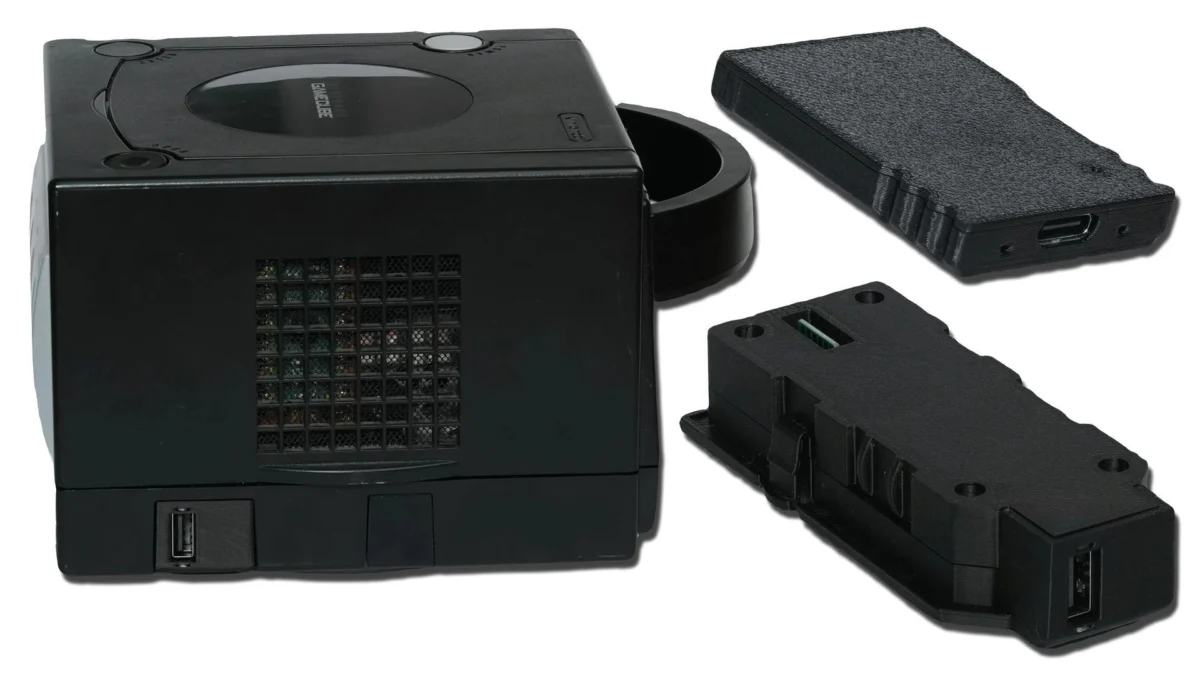
Makeo, a prominent innovator in the retro gaming hardware space, has officially launched two distinct versions of a USB 2.0 adapter designed to enhance the capabilities of the Nintendo GameCube console. These new peripherals offer GameCube enthusiasts unprecedented access to modern storage solutions and, more significantly, usher in a new era of network-based game loading through integration with the popular homebrew operating system, Swiss, and the robust RetroNAS platform. This development marks a pivotal moment for GameCube preservation and accessibility, moving beyond traditional disc-based and SD card solutions.
The two adapter variants cater to different user preferences and installation aesthetics. One version is engineered to connect seamlessly to the SP1 port located on the bottom of the GameCube console, offering a clean, almost integrated appearance. The alternative model connects via the memory card slot, providing a more accessible, albeit slightly less discreet, option for users. Both adapters serve the fundamental purpose of enabling the GameCube to interface with standard USB storage devices. This capability, when combined with Swiss, allows for the booting of homebrew applications and the direct loading of game backups from external drives.
However, the most impactful feature introduced by these adapters is their compatibility with USB Ethernet adapters, facilitating network game loading from a RetroNAS server. This functionality fundamentally transforms how GameCube owners can manage and access their game libraries. The author of the original report utilized an Ethernet adapter sold by Makeo for initial testing, expressing optimism that a broader list of compatible, cost-effective Amazon-available adapters will soon emerge, further democratizing this advanced feature.
The Evolution of GameCube Homebrew and Modding
To fully appreciate the significance of Makeo’s new adapters, it is crucial to understand the historical context of GameCube homebrew and modding. Since its launch in 2001, the Nintendo GameCube, while critically acclaimed for its innovative design and robust game library, presented inherent limitations for long-term preservation and convenience. The reliance on proprietary 8cm optical discs meant that game libraries were physical, susceptible to degradation, and required constant disc swapping. Furthermore, the console’s limited internal storage capacity, primarily addressed by small, proprietary memory cards, restricted the scope of user-created content and game save management.

The modding community quickly recognized these limitations and began developing solutions. Early efforts involved exploits like the Phantasy Star Online save file exploit or the more widespread SD Media Launcher, which allowed the console to boot unsigned code from an SD card inserted into the memory card slot via a specialized adapter (SDGecko). These initial breakthroughs laid the groundwork for the development of Swiss, a powerful homebrew utility that has become the de facto standard for GameCube enthusiasts.
Swiss, developed by emukidid and other contributors, is a multi-functional application that transcends simple homebrew loading. It provides a comprehensive suite of features including region-free gaming, enhanced video output options (such as custom resolutions and progressive scan for games that didn’t natively support it), game backup loading from various sources (SD cards, optical drive emulators), and diagnostic tools. Its continuous development has ensured that the GameCube remains a vibrant platform for modders and retro gamers.
Subsequent hardware innovations further expanded the GameCube’s capabilities. The SD2SP2 adapter, for instance, allowed SD cards to be connected to the console’s Serial Port 2, a previously unused port on the bottom of later GameCube revisions. This offered faster loading speeds than the memory card slot and a more integrated solution. Optical drive emulators (ODEs) like the GC Loader also emerged, replacing the console’s aging optical drive entirely with an SD card slot, providing near-instantaneous loading times and absolute silence. These solutions, while highly effective, often require internal installation, which can be daunting for less technically inclined users, or carry a higher price point.
RetroNAS: A Centralized Solution for Retro Game Libraries
The introduction of network loading via Makeo’s adapters and RetroNAS represents a logical and highly anticipated progression in GameCube modding. RetroNAS is an open-source, network-attached storage solution specifically tailored for retro gaming consoles. It allows users to centralize their entire collection of ROMs, ISOs, and other retro gaming media on a single server, making it accessible over a local network to various classic consoles. This eliminates the need for individual SD cards or USB drives for each console and game, simplifying library management and enhancing convenience.
The File Service Protocol (FSP) is the critical component that bridges Swiss on the GameCube with the RetroNAS server. FSP is a lightweight network protocol designed for efficient file transfer, making it ideal for streaming game data to the GameCube. This setup leverages the advantages of a home network: potentially faster data transfer rates than many SD card solutions, virtually unlimited storage capacity (limited only by the server’s hard drives), and the unparalleled convenience of a digital library accessible without physical media.

Setting Up Network Loading: A Step-by-Step Guide
Implementing network loading for the GameCube via Makeo’s USB adapter and RetroNAS requires a few straightforward steps, demonstrating the user-friendly design of this new ecosystem.
- RetroNAS Server Setup: The prerequisite is a functional RetroNAS server. Users must ensure their RetroNAS instance is operational and connected to the same local network as the GameCube.
- GameCube Prepared with Swiss: The GameCube itself must be capable of booting into Swiss. This typically involves an initial boot method such as an SD Media Launcher, a modchip, or an optical drive emulator.
- Install FSP on RetroNAS: Within the RetroNAS interface, users must navigate to the plugin management section and install the FSP (File Service Protocol) plugin. This activates the necessary network service for GameCube communication.
- Game Library Transfer: GameCube game backups (in ISO or GCM format) are then copied to the designated folder on the RetroNAS server, specifically
\retronasgamecubeswissgames. This structured directory ensures Swiss can correctly identify and categorize the titles. - Hardware Connection: The Makeo USB adapter is connected to the GameCube (either via SP1 or memory card slot), and a compatible USB Ethernet adapter is plugged into the Makeo adapter’s USB port.
- Swiss Configuration: Boot the GameCube into Swiss. Navigate to the Swiss settings menu. Here, the IP address of the RetroNAS server must be manually entered, and the port changed to
2121(the default FSP port). After saving these settings, the GameCube is ready to connect. - Initiate Network Scan: From the main Swiss menu, locate the "eject" icon (often representing media selection) and choose "File Service Protocol." Swiss will then scan the network for the configured RetroNAS server. After a brief moment, the GameCube game library hosted on RetroNAS should appear, ready for selection and loading.
Initial testing conducted by the author indicated promising performance. Two games tested loaded "just as fast as a disc, without issue," suggesting that the USB 2.0 interface and FSP protocol are robust enough to handle the data demands of GameCube titles. This performance parity with physical media, combined with the convenience of network access, is a significant achievement.
Specific Considerations for RetroNAS UnRAID Users
For users running RetroNAS within an UnRAID virtual machine or docker environment, an additional step is required to ensure proper file access permissions for the GameCube share. After installing the FSP plugin, UnRAID users must log into their server interface, navigate to the "Shares" section, and click the icon adjacent to the "RetroNAS" share. Within the share settings, the "GameCube" directory option must be checked. Following this, clicking "Permissions" at the bottom of the page and ensuring all settings are configured to "Read/Write" before hitting "Start" will grant the necessary access. This ensures that Swiss, via FSP, has full read access to the game files stored on the UnRAID-hosted RetroNAS.
Broader Implications and Community Reception

The release of Makeo’s USB GameCube adapters and their seamless integration with RetroNAS carries several significant implications for the retro gaming community:
- Enhanced Accessibility: These adapters lower the barrier to entry for GameCube game loading without physical media. Unlike complex internal modifications or expensive optical drive emulators, the Makeo adapters are external, plug-and-play solutions. This makes advanced GameCube functionality accessible to a wider audience, including those who may not be comfortable with soldering or internal hardware modifications.
- Game Preservation: By reducing reliance on aging optical drives and physical discs, the adapters contribute substantially to game preservation efforts. As GameCube optical drives inevitably fail, and discs degrade, having a robust network loading option ensures that the console’s vast library remains playable for future generations.
- Convenience and Library Management: The ability to host an entire GameCube library on a central RetroNAS server offers unparalleled convenience. Users can manage their game collection from a single point, without needing to juggle multiple SD cards or physically swap discs. This streamlines the gaming experience, making it more akin to modern digital libraries.
- Future of GameCube Modding: This development could catalyze further innovation in network-based solutions for retro consoles. As network speeds and storage technologies advance, more sophisticated streaming and loading methods may emerge, further blurring the lines between classic hardware and modern digital convenience.
- Economic Impact: The success of Makeo’s adapters could stimulate the market for similar retro console peripherals, encouraging other manufacturers to develop innovative solutions that leverage existing homebrew ecosystems. It also reinforces the value proposition of platforms like RetroNAS, potentially increasing their adoption rate.
Initial reactions from the dedicated retro gaming community have been overwhelmingly positive, signaling a strong demand for convenient and robust GameCube loading solutions. Community discussions highlight the excitement surrounding the network loading capabilities, with many users keen to test the adapters with their own RetroNAS setups. While questions about long-term compatibility with various Ethernet adapters and potential performance nuances across different games remain, the initial feedback points towards a promising future for this technology.
The author of the original article also referenced a recent livestream that showcased the Makeo adapters alongside other GameCube enhancements, including Greg’s SD2SP2 Ace, PicoLoader installations, and aesthetic upgrades like a new orange shell. While the livestream was noted as extensive, its existence underscores the community’s active engagement and the tangible nature of these advancements.
In conclusion, Makeo’s new USB 2.0 GameCube adapters represent a significant leap forward in the realm of retro gaming hardware. By offering versatile connectivity for USB storage and, critically, enabling robust network game loading through Swiss and RetroNAS, these adapters address long-standing desires within the GameCube enthusiast community. They embody a perfect synergy of modern convenience and classic hardware preservation, ensuring that the beloved Nintendo GameCube continues to provide exceptional gaming experiences for years to come.