Farhan hamdan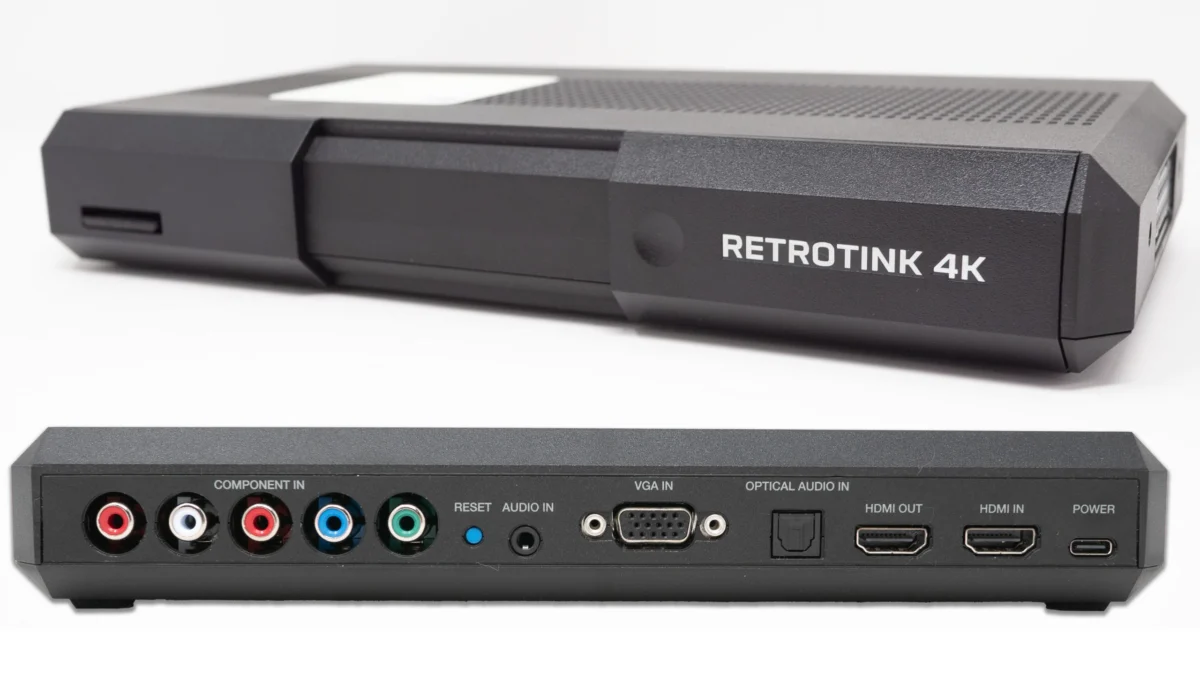
Mike Chi, the innovator behind the acclaimed RetroTINK series, has just rolled out a series of significant firmware updates for the RetroTINK 4K, bringing a host of time-saving tweaks and performance enhancements to the cutting-edge video scaler. These updates, progressively released over recent days, underscore Chi’s commitment to refining the retro gaming experience, making advanced features more accessible while delivering superior visual fidelity. The cornerstone of these enhancements is the introduction of "Auto Fill Int+," a sophisticated scaling option designed to simplify optimal pixel-perfect output, alongside a refined menu system and improved profile management features, all aimed at elevating the interaction between classic consoles and modern display technology.
The RetroTINK 4K: A Cornerstone of Modern Retro Gaming
The RetroTINK 4K stands as a paramount device in the contemporary retro gaming landscape, designed to bridge the technological chasm between vintage video game consoles and modern high-definition and ultra-high-definition displays. Unlike rudimentary analog-to-digital converters, the RetroTINK 4K is a highly sophisticated video scaler that intelligently processes and upscales low-resolution signals—such as 240p from classic consoles like the Super Nintendo, Sega Genesis, or PlayStation 1, and 480p from consoles like the Nintendo 64, PlayStation 2, or Xbox—to resolutions compatible with 4K televisions, monitors, and projectors.
Its primary objective is to deliver an image that not only appears crisp and clean but also authentically preserves the aesthetic intent of the original game. This often involves replicating the visual characteristics of traditional Cathode Ray Tube (CRT) displays, such as scanlines and aperture grilles, without introducing the inherent blur, processing artifacts, or significant input lag commonly associated with many modern TVs’ internal scaling engines. Mike Chi, the principal developer behind the RetroTINK line, has garnered a reputation for meticulous engineering and a profound understanding of video signals, making his products indispensable tools for enthusiasts seeking the highest quality retro gaming experience. The continuous development through iterative firmware updates is a testament to this commitment, ensuring the device remains at the forefront of innovation in a rapidly evolving niche, consistently meeting the discerning demands of the retro gaming community.
A Phased Rollout of Enhancements: A Chronology of Updates
The latest series of firmware updates for the RetroTINK 4K began with an initial release that laid the groundwork for several key improvements, focusing on user efficiency and visual precision. This initial wave introduced bug fixes and subtle refinements across the board, setting the stage for more impactful features. Subsequent updates, particularly those released on June 15th (version 1.28.0) and June 17th, built upon this foundation, introducing significant quality-of-life improvements and advanced scaling capabilities. These phased releases demonstrate an agile development approach, allowing for rapid iteration based on user feedback and emerging technical considerations within the retro gaming community. The updates collectively aim to simplify complex scaling operations, enhance menu navigation, and provide greater control over visual output, ultimately enriching the user’s interaction with their classic gaming library.

Auto Fill Int+: Revolutionizing Integer Scaling (June 15th Update)
One of the most significant features introduced in the June 15th update (v1.28.0) is the "Auto Fill Int+" option, a pivotal addition for optimizing the display of 240p and 480p content on modern screens. Previously, retro gaming enthusiasts often navigated complex menus to manually configure integer scaling, specifically aiming for 5x scaling for 240p content to achieve a 1080p output, or 10x scaling for 240p to reach a native 4K output. This manual process, while offering pixel-perfect results, was time-consuming and required a nuanced understanding of scaling principles.
Auto Fill Int+ automates this intricate process, akin to the "Over" option popularized by the RetroTINK 5x. When activated, the RetroTINK 4K intelligently selects the largest possible integer scale (5x for 240p to 1080p, or 10x for 240p to 4K) that fits within the display’s resolution, then slightly "overscans" the image. This overscan technique ensures that every pixel from the original console’s output is displayed, often filling the screen more completely, which many users prefer for a "CRT-overscan-like-look." This method is particularly beneficial because it maintains the crispness of integer scaling while eliminating the black borders that can appear with strict integer scaling on certain aspect ratios. For 240p content, this means an effortlessly optimized 1080p 5x or 4K 10x presentation, widely considered the gold standard for preserving pixel integrity and reducing visual artifacts.
Complementing Auto Fill Int+, the update also introduces a "Vertical Pan" option. This allows users to fine-tune the vertical position of the image on the screen after Auto Fill Int+ has been applied. If, for instance, a game’s top edge is slightly cropped due to overscan, but there’s spare room at the bottom, the Vertical Pan feature allows for precise adjustment, ensuring critical HUD elements or visual information remain visible without compromising the overall scaling quality. This small but impactful addition significantly enhances user control and customization.
The workflow improvements offered by Auto Fill Int+ are substantial. For users of the MiSTer FPGA platform, which often outputs via HDMI direct video, the time-saving benefits are particularly pronounced. Instead of configuring scaling settings for each individual core or game, users can now set Auto Fill Int+ once on the RetroTINK 4K, and all MiSTer cores will automatically scale with the "over" option and allow for easy vertical adjustment. This dramatically streamlines the setup process and ensures a consistent, high-quality output across an entire library of emulated systems.
Furthermore, this feature is a significant boon for users who employ CRT masks or shader effects to emulate the look of classic displays. Achieving accurate mask alignment previously required meticulous manual scaling adjustments to ensure the mask pixels perfectly aligned with the scaled game pixels. With Auto Fill Int+, this process is greatly simplified, as the scaler automatically handles the foundational integer scaling, allowing users to focus on applying and adjusting their preferred CRT mask without worrying about underlying pixel alignment issues. This ensures that the simulated CRT effects are rendered as intended, enhancing the authenticity of the retro experience.
For 480p sources, the advice is similar: while 1440p can be tried on 4K TVs for 480p content (often handled well by modern displays), sticking to integer options is recommended if mask rendering appears uneven. Notably, users with native 1440p displays will find a seamless experience, as 1440p is a perfect integer multiple (6x for 240p, 3x for 480p), negating the need for any "over" option. This ensures optimal display without additional tweaking for those specific monitor resolutions.

Refining the User Interface: The Evolution of Menu Navigation (June 17th Update)
Following the initial releases, Mike Chi finalized significant changes to the RetroTINK 4K’s menu system, culminating in an official new menu structure on June 17th. This refinement was a direct response to the continuous pursuit of an intuitive and efficient user experience. While earlier iterations might have explored various "Simple Mode" concepts, the finalized menu now offers a robust and user-friendly interface that balances accessibility with comprehensive control.
The core benefit of the new menu is its streamlined access to fundamental functions. Upon hitting the menu button, users are presented with quick options for input, output, scaling, and, crucially, "Starter Packs." These Starter Packs are a significant addition, providing excellent pre-configured profiles designed to deliver higher performance and optimized settings for common consoles, along with a selection of high-quality CRT masks. This feature is particularly valuable for new users or those who prefer a plug-and-play experience, as it bypasses the need for extensive manual configuration. Instead of delving into complex sub-menus, users can now quickly apply expertly tweaked settings and quality CRT masks with just a few button presses, significantly reducing setup time and ensuring a strong baseline experience.
The implementation of these Starter Packs showcases a strategic balance between user convenience and advanced customization. While the RetroTINK 4K continues to support community-built expert packs that allow for granular control and pushing the device to its limits, the official Starter Packs offer a readily available, high-performance option for a broad range of users. Should a user wish to revert to a standard output, a simple press of the "Prof" button on the remote and selecting "Load Default" instantly resets the settings, further enhancing the ease of use. This tiered approach to profiles ensures that both casual users and hardcore enthusiasts can find an optimal pathway to their desired retro gaming experience.
Advanced Profile Management: Tailoring the Experience
Beyond the revamped menu, the updates introduced two critical options within the Menu -> Profiles section, significantly aiding users who frequently switch between pre-made profiles: "Keep Current Input" and "Keep Current Resolution." These features are designed to mitigate the tedious task of reconfiguring settings when experimenting with different visual profiles.
"Keep Current Input" overrides a profile’s saved input setting, allowing the user to retain their currently active input source regardless of what the loaded profile specifies. Similarly, "Keep Current Resolution" overrides a profile’s output resolution and scaling settings, maintaining the user’s current resolution and scaling configuration.

These toggles are immensely helpful for specific use cases, such as evaluating various CRT mask profiles. Imagine a scenario where a user wants to compare several CRT masks: if each mask profile was created with a specific input (e.g., SCART) or a different resolution (e.g., 1080p120 vs. 4K60), loading each profile would necessitate manually adjusting the input and resolution every single time. By activating "Keep Current Input" and "Keep Current Resolution," users can seamlessly cycle through mask profiles, observing their effects on a consistent input and output setting without constant re-adjustment, saving considerable time and effort during experimentation.
However, it’s important to note that while beneficial for testing, these options are generally recommended to be left off for permanent profile usage. Many expertly crafted profiles, such as the "VHS Profiles," are intentionally tied to specific inputs and resolutions to achieve their desired effects. For example, a VHS profile might automatically enable 3D Comb filtering for composite video (CVBS) input but disable it for S-Video (Y/C), requiring the profile to control the input settings for optimal performance. The developer advises that for long-term use, simply making the necessary adjustments to a profile and saving it is often the best practice, ensuring all settings are synchronized for peak performance.
Speaking of the VHS profiles, a minor bug was identified in the new modeline page that necessitated a re-save and update of the VHS pack. While using the older pack wouldn’t cause harm, it would require manual resolution adjustments after loading. Users are advised to delete any previously downloaded VHS packs and replace them with the updated version to fully leverage the automation and optimized settings provided by these unique profiles. The updated VHS Pack / Modelines can be downloaded from: https://www.retrorgb.com/assets/RT4K_VHS_2026-06-12.zip.
Optimized Visuals: Enhancements to Black Frame Insertion (BFI)
The latest firmware also includes a refinement to the Black Frame Insertion (BFI) menu, a feature crucial for many retro gamers seeking to replicate the motion clarity of CRT displays. BFI works by inserting black frames between rendered frames, effectively reducing motion blur on modern LCD panels by resetting the eye’s persistence. This technique helps to simulate the impulse-driven display of CRTs, where phosphors glow briefly and then extinguish, rather than continuously displaying an image.
The updated BFI menu now provides clearer visual feedback. The "Blur" option is intelligently greyed out when not in active use, preventing confusion. More significantly, the diagnostic pattern at the bottom of the BFI menu has been enhanced to display both "CRT Beam" and "Variable MPRT" status. The "CRT Beam" indicator provides insight into how the BFI is simulating the scanning electron beam of a CRT, offering a visual representation of the effect. "Variable MPRT" (Motion Picture Response Time) status gives users an understanding of the effective response time achieved with BFI enabled, which can vary depending on the refresh rate and BFI settings. These visual cues empower users with better diagnostic information, allowing for more precise tuning of BFI settings to achieve their desired motion clarity and CRT-like visual characteristics.
Under the Hood: Stability and Bug Fixes

Beyond the user-facing features, the firmware updates also incorporated various bug fixes. While not always immediately apparent to the end-user, these behind-the-scenes improvements are crucial for maintaining the stability, reliability, and long-term performance of the RetroTINK 4K. Bug fixes address unforeseen issues, optimize code, and ensure that all features function as intended, preventing crashes or unexpected behavior. The specific re-saving and updating of the VHS pack modelines, due to a bug in the previous modeline page, is an example of such a critical fix, ensuring that profile automation works flawlessly. These continuous efforts in software refinement are integral to delivering a premium hardware experience, reinforcing confidence in the RetroTINK 4K as a robust solution for advanced retro gaming.
Broader Implications for the Retro Gaming Community
These comprehensive firmware updates for the RetroTINK 4K carry significant implications for the retro gaming community, reinforcing the device’s position as a leading-edge scaler. The collective enhancements translate into a vastly improved user experience, making advanced features more accessible and reducing the barrier to entry for achieving optimal visual fidelity.
The "Auto Fill Int+" feature, in particular, represents a major step forward in simplifying the often-complex world of integer scaling and pixel-perfect output. By automating the optimal 5x/10x scaling for 240p content, Mike Chi has democratized a technique previously reserved for more technically inclined users. This means more retro gamers can now enjoy crisp, artifact-free images that truly honor the original artwork of classic games, especially when combined with CRT mask emulation, without investing hours in manual configuration. The added "Vertical Pan" provides a level of granular control that caters to individual display preferences and game-specific overscan issues, showcasing an attention to detail that resonates deeply with enthusiasts.
The evolution and finalization of the menu system, coupled with the introduction of "Starter Packs," significantly streamlines the setup process. New users, or those simply looking for quick, high-quality results, can now leverage pre-optimized profiles and CRT masks, dramatically cutting down the time from unboxing to playing. This accessibility doesn’t come at the expense of advanced control; rather, it provides a well-curated starting point while still allowing seasoned users to delve into deeper customization. This tiered approach fosters broader adoption and reduces frustration, which are vital for a niche market.
Furthermore, the enhanced profile management options—"Keep Current Input" and "Keep Current Resolution"—demonstrate a responsiveness to power-user workflows. These features, while seemingly minor, offer immense time-saving benefits for those who frequently experiment with different settings or test various visual effects. They exemplify Chi’s understanding of how enthusiasts interact with his hardware, continuously iterating to refine the user journey.
The ongoing commitment to bug fixes and refinements, as seen with the VHS pack update and BFI menu improvements, underscores a dedication to stability and continuous improvement. This proactive development ensures that the RetroTINK 4K remains a reliable and future-proof investment in a hobby that increasingly demands precision and authenticity. The overall impact is a more intuitive, powerful, and enjoyable retro gaming experience, solidifying the RetroTINK 4K’s reputation as an indispensable tool for preserving and enhancing classic video games on modern displays. Mike Chi’s consistent engagement with the community and iterative firmware releases continue to set a high standard for hardware development in the retro gaming sphere.

Accessing the Latest Firmware and Resources
To take advantage of these significant enhancements and ensure your RetroTINK 4K is operating with the latest optimizations, users are encouraged to download the updated firmware.
- Download Firmware Here: https://retrotink-llc.github.io/firmware/4k-experimental.html
- Purchase RetroTINK Products: https://retrorgb.com/retrotink.html
- Updated VHS Pack / Modelines: https://www.retrorgb.com/assets/RT4K_VHS_2026-06-12.zip
These updates reinforce the RetroTINK 4K’s position as a premier solution for retro gaming, continually evolving to meet the demands of enthusiasts and provide an unparalleled visual experience for classic consoles on modern displays.