 Vera Clarissa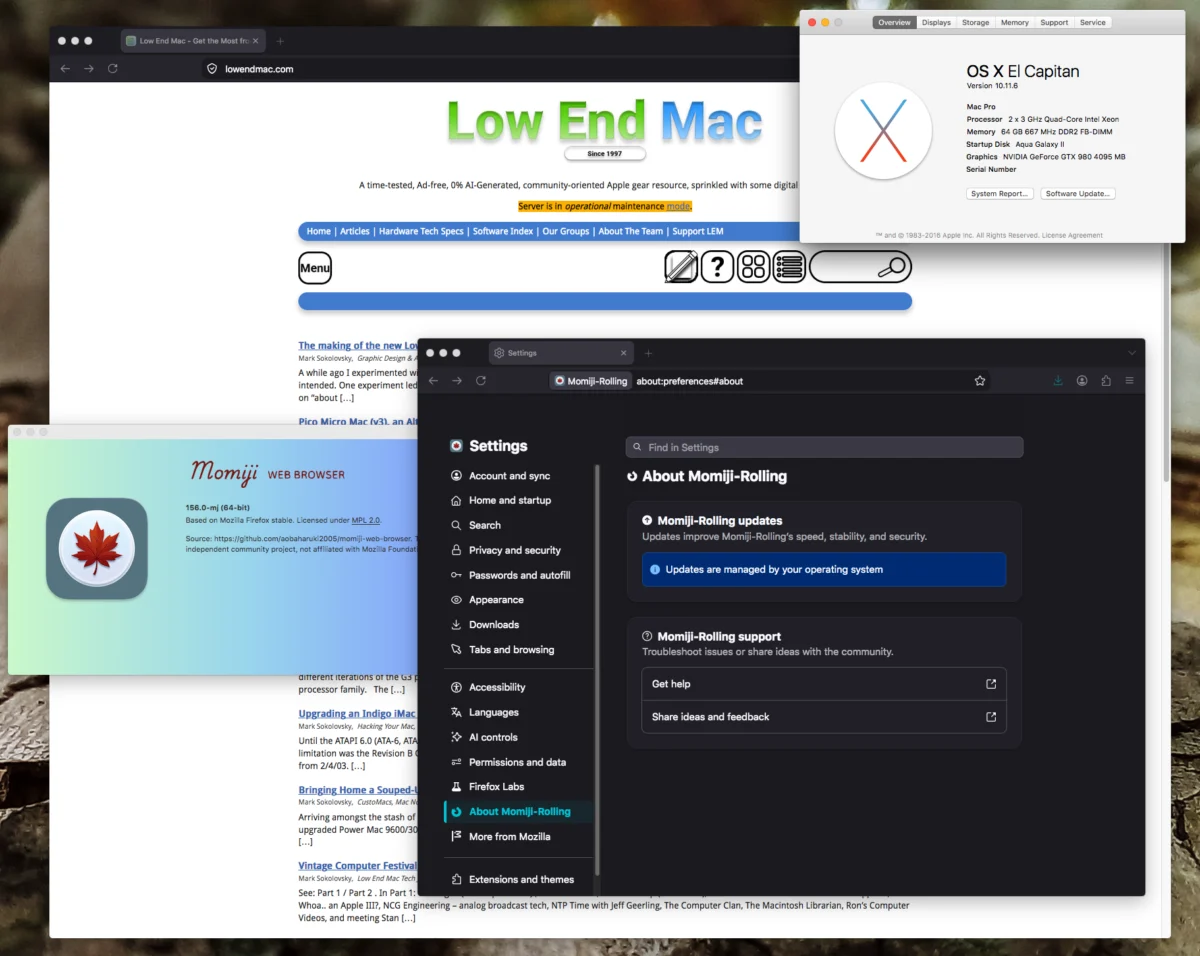
The landscape of legacy computing has shifted significantly this September 2026, as developer aobaharuki2005 released critical updates to the Momiji web browser project. These updates, specifically the stable version 140.16 and the cutting-edge rolling build based on Firefox 156.0, represent a milestone for owners of vintage Intel-based Apple hardware. By bridging the gap between two-decade-old architecture and modern web standards, the Momiji project ensures that machines ranging from the OS X Lion era through to macOS Mojave remain functional participants in the contemporary internet ecosystem.
Technical Scope and Hardware Compatibility
The Momiji browser is engineered specifically for 64-bit Intel Macs utilizing Core 2 Duo (Conroe and Merom) processors or later. This architectural requirement is absolute; 32-bit Core Duo systems are excluded from support, effectively drawing a line in the silicon sand at the 2006–2007 hardware transition. The browser is distributed in two distinct branches: one optimized for the "Lion through El Capitan" software lifecycle and another tailored for the "Sierra through Mojave" transition.
By targeting the Conroe and Merom instruction sets, the browser maintains a delicate balance between leveraging modern rendering engines and adhering to the limitations of legacy memory controllers and bus speeds. The integration of Firefox 156.0—a version released only weeks prior—into a browser designed for software as old as 2011 is a feat of cross-version compilation that allows users to bypass the forced obsolescence typically imposed by modern SSL/TLS certificate requirements and evolving HTML5/CSS standards.

Chronology of the Momiji Project
The Momiji project has operated as an iterative response to the cessation of official browser support for older versions of macOS. The following timeline outlines the progression of the project through 2026:
- Q1 2026: Initial public release of the Momiji base, focusing on porting core Firefox components to legacy environments.
- Summer 2026: Version 140.12 gains traction among the retro-computing community, particularly for those utilizing Mac Pro 2,1 and early iMac models.
- September 2026: Release of v140.16 (Stable) and the v156.0 (Rolling Build). This release marks the first time a browser with such a recent upstream base has been successfully compiled for the Mojave-era legacy stack.
- Late September 2026: Community reports confirm improved stability in JavaScript execution and DOM rendering across El Capitan and High Sierra installations.
Performance Analysis and Benchmarking
While raw synthetic benchmarks often struggle to capture the user experience on hardware of this vintage, the performance shift is notable. On the Speedometer 3.1 benchmark, the Momiji 156.0 build achieves a score of 4.29. While this figure appears modest compared to contemporary Silicon-based Macs, it represents a substantial increase in responsiveness for machines that previously struggled to parse modern, script-heavy web pages.
The qualitative performance gains are particularly visible in the browser’s "day-to-day" operations. Users report that common UI interactions—such as tab management, window dragging, and full-screen transitions—no longer suffer from the input lag that plagued previous iterations. The browser demonstrates a refined memory management system, allowing for a higher density of open tabs before the system forces memory swapping to the hard drive, a critical bottleneck for DDR2-era hardware.
The Role of Security in Legacy Computing
One of the primary drivers for the Momiji project is the critical necessity of security patches. As web standards evolve, older browsers become incapable of handling modern cryptographic protocols, rendering them unable to connect to many secure websites. By maintaining a rolling build based on Firefox 156.0, Momiji provides users with the latest security fixes, ensuring that vulnerabilities patched in the main Firefox branch are propagated to the legacy user base.

For those running macOS Sierra, High Sierra, or Mojave, this is more than a convenience; it is a security necessity. These operating systems no longer receive official security updates from Apple, leaving the browser as the primary defensive layer between the user and malicious web-based threats. By providing a secure, up-to-date environment, Momiji effectively extends the service life of machines that would otherwise be relegated to offline or limited use.
Implications for the Retro-Computing Community
The continued development of Momiji has profound implications for the preservation of vintage hardware. The "daily-driver" status of a Mac Pro 2,1, a machine released in 2007, is a testament to the longevity of Apple’s early Intel-era engineering. When software support catches up to hardware capability, the perceived value of these machines increases, shifting them from "e-waste" categories back into functional tools.
Furthermore, the project highlights the potential of the open-source community to circumvent planned obsolescence. By utilizing the Firefox codebase as a foundation, aobaharuki2005 has demonstrated that the technical limitations of 20-year-old hardware are often overstated. The primary barrier to using older Macs in 2026 has not been the CPU clock speed or the amount of RAM, but rather the software layer’s inability to translate modern web requests.
Implementation Guidelines
For users looking to deploy the latest version, the installation process is designed to be straightforward. The browser is hosted on GitHub, where users can select the binary corresponding to their specific OS branch.

The transition process is optimized for minimal friction:
- Download: Obtain the relevant package from the official repository.
- Deployment: Replace the existing browser application within the Applications folder.
- Data Preservation: By naming the application folder exactly as the previous instance ("Momiji"), the browser automatically detects and retains existing configuration files, including bookmarks, browsing history, and saved credentials.
Broader Technological Context
The existence of the Momiji browser serves as a case study in the resilience of legacy software. As industry trends push toward cloud-based software as a service (SaaS), the ability to run a modern browser on a legacy platform is the difference between a functional computer and a static hardware display. The work performed on Momiji aligns with broader efforts in the computing community to maintain access to older technology, an objective that has gained momentum as environmental concerns regarding electronic waste continue to rise.
By providing a bridge to the modern web, the Momiji project allows legacy Mac users to maintain productivity without the need to purchase new hardware. This approach not only respects the original investment made by users in high-quality hardware but also contributes to a more sustainable lifecycle for personal computing devices. As the browser continues to evolve alongside the Firefox release cycle, the divide between the early Intel era and the current computational environment continues to narrow, offering a unique opportunity for enthusiasts and professionals alike to keep their classic machines relevant in an increasingly fast-paced digital world.