 Vera Clarissa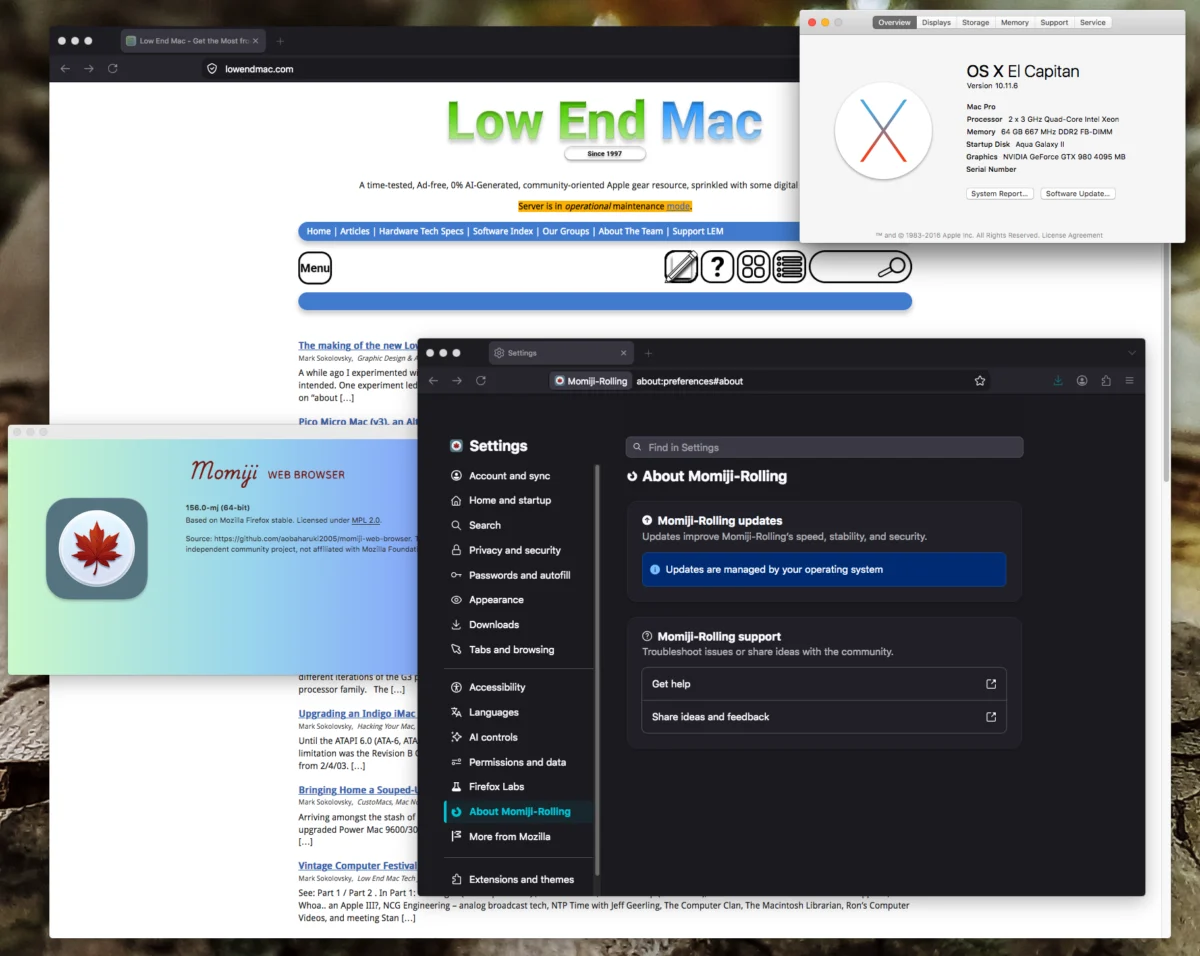
The landscape for vintage computing enthusiasts has shifted significantly this month, as developer aobaharuki2005 released updated versions of the Momiji web browser on GitHub. These releases include a stable build, version 140.16, and a rolling build based on the Firefox 156.0 codebase. Designed specifically to bridge the gap between two-decade-old hardware and the modern, resource-heavy internet, these updates provide critical security patches and performance optimizations for a wide array of legacy Apple operating systems, spanning from OS X 10.7 Lion through macOS 10.14 Mojave.
Technical Context and Hardware Requirements
The Momiji browser project targets 64-bit Intel-based Macintosh computers equipped with Core 2 Duo (Conroe/Merom) architectures or later. This hardware requirement is essential, as the browser relies on 64-bit instruction sets that are absent in earlier 32-bit Core Duo processors. By leveraging the upstream development of the Firefox engine, Momiji acts as a vital utility for users maintaining "daily driver" status for systems that have long since lost official browser support from vendors like Apple, Google, and Mozilla.
The software is distributed in two distinct branches to accommodate the varying architecture of the macOS ecosystem: a legacy build intended for OS X Lion through OS X El Capitan, and a secondary build tailored for macOS Sierra through macOS Mojave. This segmentation allows the browser to utilize system-specific APIs while maintaining compatibility with the latest web standards, including modern CSS, HTML5, and JavaScript execution environments that have rendered native versions of Safari and older Firefox iterations effectively obsolete.
A Chronology of Legacy Support
The decline of official browser support for older macOS versions began in earnest around 2020, as web standards evolved to require newer Transport Layer Security (TLS) protocols and hardware acceleration features that legacy software could not support. Since then, the community of "Low End Mac" users has relied on hobbyist-maintained projects to keep aging hardware relevant.

The Momiji project represents a continuation of this effort. Earlier this year, the release of version 140.12 marked a turning point for performance on systems like the Mac Pro 2,1 and mid-2000s MacBook Pro units. The progression from 140.12 to the current 156.0 rolling build demonstrates an accelerated development cycle. The integration of Firefox 156.0—a version released in September 2026—brings these legacy machines into parity with modern web security requirements, addressing vulnerabilities that have plagued outdated versions of WebKit and Gecko engines for years.
Performance Analysis and Benchmarking
While raw benchmark data, such as the Speedometer 3.1 score of 4.29, might appear low by contemporary standards, observers note that synthetic benchmarks often fail to capture the subjective user experience on older hardware. Real-world testing indicates that the Momiji 156.0 release offers significant improvements in UI responsiveness.
Internal testing on El Capitan configurations demonstrates that the browser effectively resolves common "hanging" issues associated with tab management and window rendering. Key areas of improvement include:
- Asynchronous UI Rendering: Reduced latency during tab switching and window dragging.
- Memory Management: Enhanced capability to handle multiple concurrent tabs without triggering swap-file degradation on systems limited by DDR2 or early DDR3 RAM.
- Graphics Acceleration: Improved handling of modern web-based graphical elements, which previously caused severe stuttering on integrated GPUs.
These improvements are critical for hardware like the Mac Pro 2,1, which utilizes a Clovertown-era Xeon architecture. By optimizing the browser’s interaction with the system’s memory controller, the Momiji project has successfully extended the functional lifespan of machines that were manufactured nearly twenty years ago.
Implications for the Retro-Computing Community
The ability to run a modern, secure browser on legacy macOS versions has broader implications than mere convenience. It ensures that vintage hardware remains accessible for academic, archival, and hobbyist purposes. As the web moves further toward encrypted and complex protocols, the gap between old machines and modern servers grows. Projects like Momiji effectively serve as a digital "translation layer," allowing users to access modern content without the overhead of modern, bloated operating systems.

Furthermore, the shift toward a "rolling build" model for Momiji 156.0 suggests that the developer intends to keep the project synchronized with the rapid pace of the Mozilla Firefox development cycle. This commitment provides a roadmap for long-term usability, ensuring that security patches for the core engine are propagated to the legacy user base in a timely manner.
Strategic Deployment and Best Practices
For users looking to implement these updates, the process is streamlined to minimize configuration errors. The browser is hosted on GitHub, and installation follows a standard macOS application deployment: moving the package into the Applications directory.
A notable aspect of this release is the preservation of user data. By naming the application file "Momiji," the software automatically detects and integrates existing profiles, bookmarks, and settings from previous installations. This continuity is vital for users who have spent years curating their browsing environments on older OS versions.
Broader Impact on Software Longevity
The persistent interest in maintaining these machines is not merely nostalgic. The 2006–2018 era of Apple hardware represents a peak in modularity and repairability. The Mac Pro and MacBook Pro models from this period are highly prized for their ability to be upgraded with SSDs, increased RAM, and internal drive arrays.
When software like Momiji arrives to fill the "browser gap," it removes the primary barrier to using these machines in a professional or semi-professional capacity. The community response highlights a consensus: the limitation of these machines was never the CPU or the RAM, but rather the obsolescence of the software stack. By modernizing the browser, the developer has fundamentally changed the usability of the machines, effectively turning "e-waste" back into functional computing tools.

Future Outlook
As of late 2026, the development of Momiji continues to be driven by community feedback and the proactive work of contributors on platforms like GitHub. The transition to the 156.0 codebase signals a robust future for the project. While no software can indefinitely keep twenty-year-old hardware in step with the cutting edge of web technology, the current trajectory suggests that these machines will remain viable for general web browsing for several years to come.
The success of this project also serves as a case study for the value of open-source software in hardware preservation. By decoupling the browser from the proprietary constraints of the host operating system, Momiji provides a template for how other legacy ecosystems might be maintained. As long as there is an active user base, the intersection of modern security standards and vintage hardware will continue to evolve, proving that with the right software, even the most aged computing equipment can remain an integral part of the modern digital experience.