 Vera Clarissa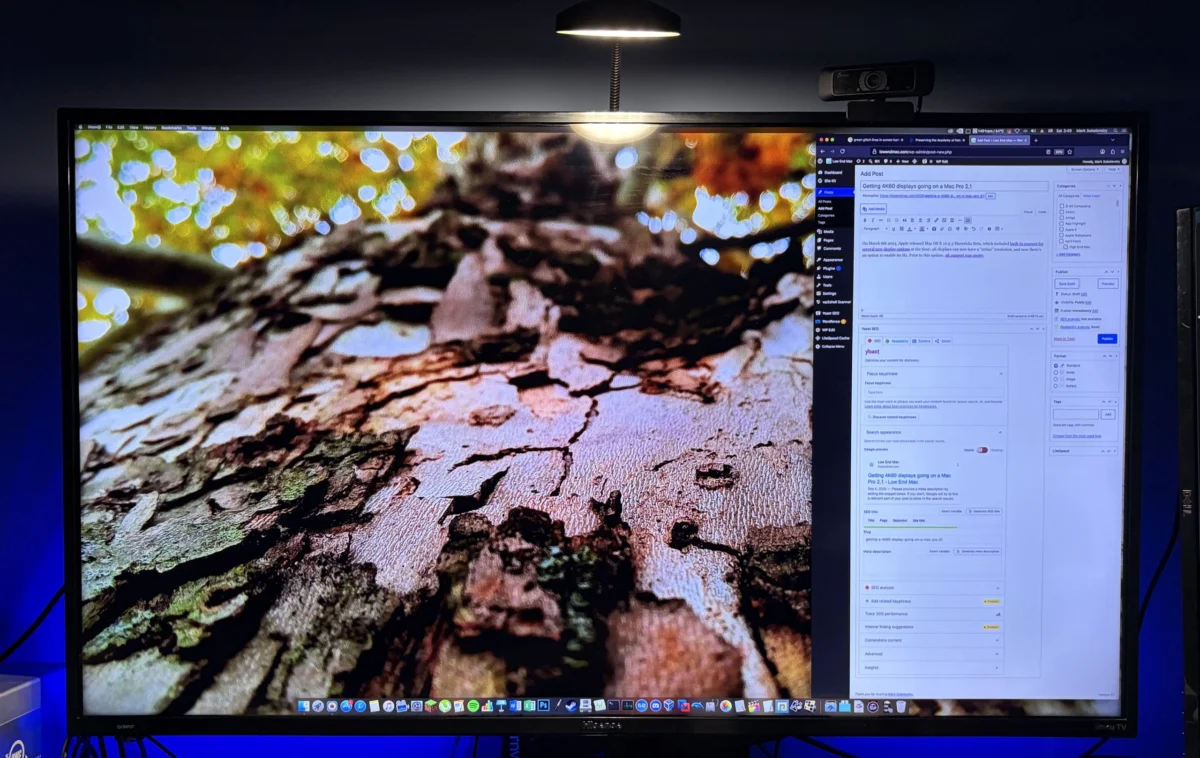
The pursuit of high-resolution computing on aging hardware has long been a hallmark of the enthusiast community, but recent developments in display technology and legacy system optimization have reached a new milestone. In 2026, it has been demonstrated that the original first and second-generation Mac Pro models—released between 2006 and 2008—are capable of supporting 4K resolution at a 60 Hz refresh rate. While these machines were designed for a different era of display standards, the integration of modern GPUs and specific OS X configurations has effectively bridged the gap between nearly two decades of technological progress, allowing these legacy towers to function as viable daily drivers in a modern, high-density display environment.
A Chronology of Mac Pro Display Evolution
The Mac Pro line, particularly the 2006 (1,1) and 2007 (2,1) models, was originally engineered for the era of dual-link DVI and analog connectivity. When these machines debuted, the industry standard for professional workstations revolved around dual-monitor setups with 1920×1200 resolution. As display technology transitioned toward 4K (3840×2160), Apple’s software support initially lagged.
On March 6, 2014, Apple released the OS X 10.9.3 Mavericks Beta, a pivotal moment in the history of high-resolution support. This update provided the first formal, native "Retina" resolution scaling for 4K displays and enabled 60 Hz refresh rates, which had previously been relegated to experimental or "spotty" compatibility. Before this update, users attempting to utilize 4K panels were often limited to 30 Hz via HDMI, resulting in significant input latency and a perceived "choppiness" that made professional UI work cumbersome.

By 2026, the barrier to entry for 4K hardware has effectively evaporated. Consumer-grade 4K televisions, such as the Hisense 43R6 and various Insignia models, are now available for as little as $139 to $300. This shift in the consumer market has prompted enthusiasts to revisit their legacy Mac Pro hardware, not merely for archival purposes, but as functional, high-performance workstations capable of handling modern multitasking workloads.
Technical Infrastructure and Hardware Requirements
Achieving a 4K 60 Hz output on a Mac Pro 2,1 requires a specific stack of hardware and software components. The primary bottleneck in legacy systems is the interface bandwidth and the capabilities of the installed graphics processing unit (GPU). While the base model’s internal components are limited by the PCIe 1.0 architecture, the installation of a modern GPU—such as the Nvidia GTX 980—reconfigures the machine’s output capabilities.
The GTX 980, featuring 224 GB/s of local VRAM bandwidth, is more than sufficient to handle the GUI rendering demands of a 4K display. In practical terms, rendering a desktop interface at 4K resolution consumes less than 1% of the card’s total available bandwidth. The challenge lies in the handshake between the GPU and the display, which necessitates an active adapter or high-quality cabling to ensure data integrity.
In recent testing, the transition from simple DVI-to-HDMI cables to more sophisticated, active display adapters resolved the 30 Hz refresh rate limitation. While the initial initialization of the display presented some transient data-integrity issues, these were addressed through a cold-boot cycle, allowing the display to properly initialize during the boot sequence. This demonstrates that the limitation in legacy machines is often a result of software handshake protocols and cable bandwidth rather than a lack of raw processing power.

Comparative Performance Metrics
When comparing a 2006-era Mac Pro to a contemporary M4 Mac mini, the differences in raw compute are stark, yet the user experience remains surprisingly competitive for specific productivity tasks. The legacy machine, when equipped with an OWC Mercury Accelsior PCIe blade-style SSD, provides read/write speeds of approximately 288 MB/s. While this pales in comparison to modern NVMe drives, it is sufficient to eliminate the bottlenecking that historically plagued mechanical hard drives in these systems.
The following data points illustrate the current capability of the refreshed Mac Pro 2,1:
- Display Output: 4K (3840×2160) at 60 Hz.
- GPU Bandwidth Utilization: < 1% for standard GUI operations.
- Storage Throughput: 288 MB/s via PCIe SSD.
- Operating System: OS X El Capitan, providing a balance between legacy application compatibility and modern interface stability.
The ability to maintain a 60 Hz refresh rate is critical for modern UI responsiveness. At 30 Hz, mouse cursor movement and window scrolling exhibit a perceptible lag that can lead to eye strain and reduced productivity. By achieving 60 Hz, the Mac Pro 2,1 transcends its status as a "legacy curiosity" and enters the realm of a legitimate, if unconventional, secondary workstation.
Implications for Legacy Systems and Sustainability
The move toward utilizing 4K displays with legacy hardware carries significant implications for the "Right to Repair" and sustainability movements within the tech industry. By extending the functional lifespan of a chassis built in 2007, users are avoiding the electronic waste cycle and extracting further value from well-engineered, modular hardware.

The Mac Pro 2,1’s architectural design—specifically its abundance of PCIe slots and internal drive bays—provides a level of flexibility that is often absent in modern, non-upgradable Apple Silicon machines. For power users, the ability to maintain a library of legacy Intel-based applications, perform virtualization of older operating systems, and manage high-density storage arrays makes these machines highly desirable as "combo-Mac" setups alongside modern hardware.
Industry analysts note that while the performance-per-watt ratio of these machines is significantly worse than modern ARM-based systems, the "bang for your buck" remains high. When the cost of a 4K display is factored in, the total investment for a highly capable, albeit vintage, workstation is often significantly lower than the cost of a mid-range modern PC.
Broader Impact on the Enthusiast Market
The integration of 4K displays has shifted the perception of what these machines can achieve. In 2015, the primary appeal of the Mac Pro 2,1 was its modularity and raw expansion capabilities. In 2026, the appeal has expanded to include "effective productivity." Using a 4K display allows for multiple windows to be open simultaneously, a necessity for modern professional workflows that the 1920×1200 monitors of the mid-2000s could not accommodate.
Furthermore, the stability of the platform, particularly when running refined versions of OS X like El Capitan, provides a familiar environment for long-time users. As developers continue to experiment with bootable SATA III configurations—which would effectively double the storage throughput compared to current setups—the ceiling for what these 20-year-old machines can do continues to rise.

The success of these projects serves as a testament to the longevity of high-end hardware. While Apple’s official support for these models ended years ago, the enthusiast community has successfully maintained a path for these machines to coexist with modern peripherals. As long as these systems can communicate effectively with 4K output devices, they will continue to occupy a unique space in the computing landscape, proving that hardware longevity is often as much about software-side optimization as it is about the components themselves.
Conclusion: The Future of the Vintage Desktop
The ability to drive a 4K 60 Hz display is the final piece of the puzzle for the modern vintage workstation. By overcoming the refresh rate limitations of the past, users have transformed a relic of 2007 into a machine that feels, for all intents and purposes, modern in its interaction and display quality. As storage solutions continue to improve and as users find increasingly creative ways to leverage the PCIe architecture, the Mac Pro 2,1 remains a cornerstone of the "maximalist" OS X computing experience.
Whether it is used for software preservation, legacy gaming, or as a secondary productivity hub, the Mac Pro 2,1 has proven that with the right combination of modern displays and thoughtful component upgrades, the lifespan of professional-grade hardware can be extended far beyond original expectations. The shift toward 4K as a standard—even on vintage silicon—marks a permanent change in how we define "obsolescence," suggesting that as long as a machine can render a fluid, high-resolution interface, it remains a relevant tool in the modern digital age.