 Farhan hamdan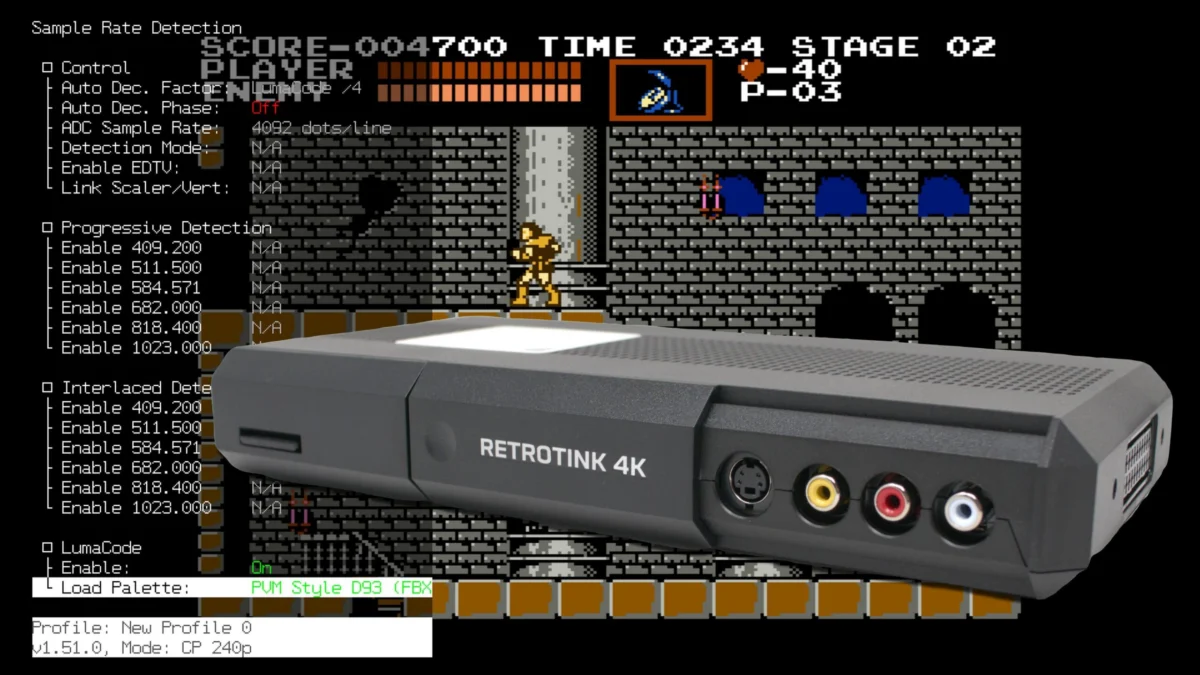
Mike Chi, the acclaimed innovator behind the RetroTINK series, has rolled out an experimental firmware update for both the RetroTINK 4K Pro and 4K CE, marking a significant milestone with the preliminary integration of Lumacode support. This initial implementation, while experimental and potentially subject to bugs, opens a new frontier for enthusiasts seeking unparalleled visual fidelity from their Nintendo Entertainment System (NES) consoles, particularly those equipped with the specialized Lumacode mod. Beyond this groundbreaking addition, the firmware also introduces several other notable improvements, including an updated Horizontal Blur filter engine for the 4K Pro, a "Native Sampling" option to enhance generic input signals, and a convenient AUX4 button function to reset input crops to their default positions.
The release underscores RetroTINK’s commitment to continuous innovation and the pursuit of optimal retro gaming experiences on modern displays. For a community dedicated to preserving the authentic look and feel of classic games, these advancements represent critical steps forward in bridging the technological gap between vintage hardware and contemporary high-definition screens.
The Dawn of Lumacode Integration on RetroTINK 4K
At the forefront of this experimental firmware release is the eagerly anticipated Lumacode support. Lumacode, a brainchild of the talented developer known as c0pperdragon, represents a highly sophisticated method for extracting a near-perfect digital video signal from the NES. Unlike traditional analog video outputs (composite, S-Video, RGB) which are susceptible to noise, artifacts, and signal degradation, Lumacode directly taps into the NES’s Picture Processing Unit (PPU) signals, digitizing them at an incredibly high precision. This process effectively bypasses the console’s inherent analog limitations, allowing for a remarkably clean, pixel-perfect, and digitally accurate representation of the NES’s output. Historically, Lumacode required specialized capture hardware or complex setups to be fully utilized, making its integration into a user-friendly device like the RetroTINK 4K a pivotal moment for NES enthusiasts.
The significance of this integration cannot be overstated. For years, retro gamers have grappled with the challenge of displaying NES games authentically on modern 4K televisions. While various upscalers and mods have offered improvements, Lumacode promises a level of clarity and color accuracy that closely aligns with the original digital intent of the NES hardware, free from the analog compromises that defined its initial output. By enabling Lumacode support on the RetroTINK 4K platform, Mike Chi is democratizing access to this elite video output, making it available to a broader segment of the retro gaming community without requiring a deep dive into highly specialized, one-off solutions.
Installation and Configuration for Lumacode
To activate Lumacode support, users must first download the experimental firmware from the official RetroTINK-LLC GitHub page. The process involves extracting the firmware file to the RetroTINK 4K’s SD card and performing an update via the On-Screen Display (OSD) menu. The firmware package includes a dedicated Lumacode folder containing necessary files, including specific NES color palettes, which are crucial for accurate color reproduction.
Once the firmware is updated, the Lumacode-modified NES console should be connected to any of the "Green" video inputs on the RetroTINK 4K (RCA, SCART, or VGA). After powering on the console, users must select the corresponding input via either the YPbPr or RGsB modes. The crucial steps then involve navigating to "Advanced Settings," selecting "Sample Rate Detection," choosing "Lumacode," and finally hitting "Enable." The firmware currently supports a system preset for the NES, which has been the primary focus of testing. Following the preset loading, users may need to fine-tune the "ADC pre-gain" within the ADC menu until the image stabilizes, a process reminiscent of setting up other high-precision analog-to-digital converters like the Open Source Scan Converter (OSSC). RetroTINK 4K CE users will also need to manually trigger the auto-phase button on their remote, whereas 4K Pro units automate this step. Upon successful configuration, the NES will output a pristine, 4K "HDMI-like" signal, a testament to the combined power of Lumacode and the RetroTINK 4K’s advanced scaling capabilities.
Enhancing Visual Aesthetics: The Updated Horizontal Blur Filter Engine
Another significant enhancement, exclusive to the RetroTINK 4K Pro, is the updated Horizontal Blur filter engine. This feature addresses a long-standing challenge in retro gaming emulation and upscaling: accurately rendering dithering effects. Many classic games, particularly from the 16-bit era, utilized dithering – a technique of alternating pixels of different colors – to simulate transparency, blend colors, or create the illusion of more colors than natively available. On original Cathode Ray Tube (CRT) televisions, the analog nature of composite video would naturally blend these dithered patterns, resulting in smooth transitions and intended visual effects. However, on modern, pixel-perfect digital displays, dithering often appears as harsh, distracting patterns, undermining the original artistic intent.
The new Horizontal Blur filter engine is designed to meticulously replicate the blending effect of composite video on a CRT, even when processing RGB sources. This means users can achieve the aesthetic benefits of composite video’s dithering blend without incurring its typical drawbacks, such as color bleeding, rainbow artifacts, or general signal softness. The filter offers precise control, allowing users to "dial-in" the blur level to perfectly blend finer dithering patterns, thus restoring the intended transparency or color gradients. When combined with the RetroTINK 4K’s advanced scanline packs, the effect becomes even more compelling, creating an immersive, authentic retro visual experience. As demonstrated by community experts like "Wobbling Pixels," this feature allows for a level of fidelity previously unattainable without resorting to actual composite video connections, effectively giving users "all the benefits of composite video, with none of the drawbacks." This capability is particularly relevant for systems like the Sega Genesis, which famously relied on dithering for its water effects and other visual tricks.
Optimizing Generic Signals with "Native Sampling"
The firmware update also introduces a "Native Sampling" option, designed to improve the visual quality of generic input signals—those for which no specific console profile has been loaded. While not intended to replace the meticulously crafted, console-specific profiles that dial in exact sampling numbers for optimal results, Native Sampling provides a general improvement for sources that might otherwise appear suboptimal.

This feature works by further oversampling horizontally, which helps to clean up and stabilize input signals without the need for complex interpolation algorithms. The result is a potentially cleaner and sharper image for unprofiled sources, offering a subtle but noticeable enhancement. Native Sampling is available on both the RetroTINK 4K CE and Pro models, though its full 4K implementation is currently limited to the 4K Pro, leveraging its advanced processing capabilities. This addition reflects Mike Chi’s dedication to improving the device’s performance across the board, ensuring that even less common or unsupported sources receive a baseline level of high-quality processing.
Streamlining User Experience: The AUX4 Crop Reset
A quality-of-life improvement that will be welcomed by many users, particularly those who frequently adjust their screen geometry, is the new AUX4 button function. This feature allows users to instantly reset input crops to their base position. In the past, if a user "zoomed" into a game’s picture using the cropping feature to fill the screen or remove borders, switching to a different game would often leave the previous crop settings active. Rectifying this previously required loading a default profile, re-loading a console-specific profile, or manually resetting the crop settings, which could be cumbersome.
The AUX4 shortcut simplifies this process dramatically. A single press now restores the default crop, making it significantly faster and more convenient for users who frequently switch between games or consoles with varying aspect ratios and display requirements. While not a feature every user will employ daily, it represents a thoughtful enhancement that addresses a common pain point for a dedicated segment of the RetroTINK 4K user base, showcasing an attention to user feedback and practical usability.
The RetroTINK Ecosystem: A Legacy of Innovation
This latest experimental firmware release is not an isolated event but rather a continuation of Mike Chi’s enduring legacy within the retro video hardware community. Since the inception of the RetroTINK series, beginning with earlier models like the RetroTINK 2X and culminating in the advanced 4K Pro and 4K CE, Chi has consistently pushed the boundaries of what’s possible in upscaling and signal processing for classic gaming systems. His devices have become industry standards, renowned for their low latency, high fidelity, and user-friendly design.
The RetroTINK 4K Pro and 4K CE, in particular, represent the pinnacle of this development, offering unparalleled flexibility and performance for converting analog video signals from vintage consoles into pristine 4K digital outputs. The philosophy behind these devices is rooted in a deep understanding of analog video signals and the specific challenges they pose when displayed on modern digital screens. Through continuous firmware updates, Chi ensures that his hardware remains at the cutting edge, adapting to new community findings, addressing user needs, and integrating groundbreaking technologies like Lumacode.
Broader Implications for Retro Gaming Preservation
The integration of Lumacode and the refinement of features like the Horizontal Blur filter have profound implications for the broader retro gaming preservation movement. As older consoles and their display technologies become increasingly rare or difficult to maintain, high-quality upscalers like the RetroTINK 4K become indispensable tools for experiencing these games on contemporary hardware. These advancements allow enthusiasts to play classic titles not just for nostalgia, but to genuinely appreciate their original artistic and technical merits in a manner that closely mirrors, or in some cases even surpasses, their initial presentation.
Lumacode’s ability to provide a "perfect" digital NES signal, combined with the RetroTINK 4K’s advanced scaling and filtering options, offers a dual approach to preservation: one focused on absolute signal accuracy, and another on artistic emulation. This dual capability ensures that players can choose between a hyper-accurate, pixel-perfect representation or a beautifully filtered, CRT-emulated experience, catering to different preferences within the retro gaming community. This flexibility is crucial for a hobby that values both technical precision and nostalgic authenticity.
Community Reception and Future Outlook
Given the significance of Lumacode support and the other substantial improvements, the retro gaming community is expected to react with considerable enthusiasm. The "experimental" designation for the Lumacode firmware is a clear signal that users should anticipate and report any bugs or issues, contributing to its refinement and stability. This collaborative approach, where community feedback directly influences future development, has been a hallmark of the RetroTINK ecosystem.
While currently focused on the NES, the successful implementation of Lumacode on the RetroTINK 4K could potentially pave the way for similar integrations with other systems, should Lumacode-like solutions emerge for different consoles. This firmware update solidifies the RetroTINK 4K’s position as a future-proof investment for serious retro gamers and preservationists. The ongoing development, marked by regular updates and the introduction of cutting-edge features, ensures that the platform will continue to evolve, pushing the boundaries of what’s possible in the world of retro video.
The experimental firmware is available for download at the provided link: https://retrotink-llc.github.io/firmware/4k-experimental.html. For those interested in acquiring RetroTINK products or exploring additional resources such as the updated VHS Pack and Modelines, further information can be found via the links provided in the original announcement. This update represents more than just a software patch; it’s a testament to the ongoing innovation that keeps the spirit of classic gaming vibrant and accessible for generations to come.