 Farhan hamdan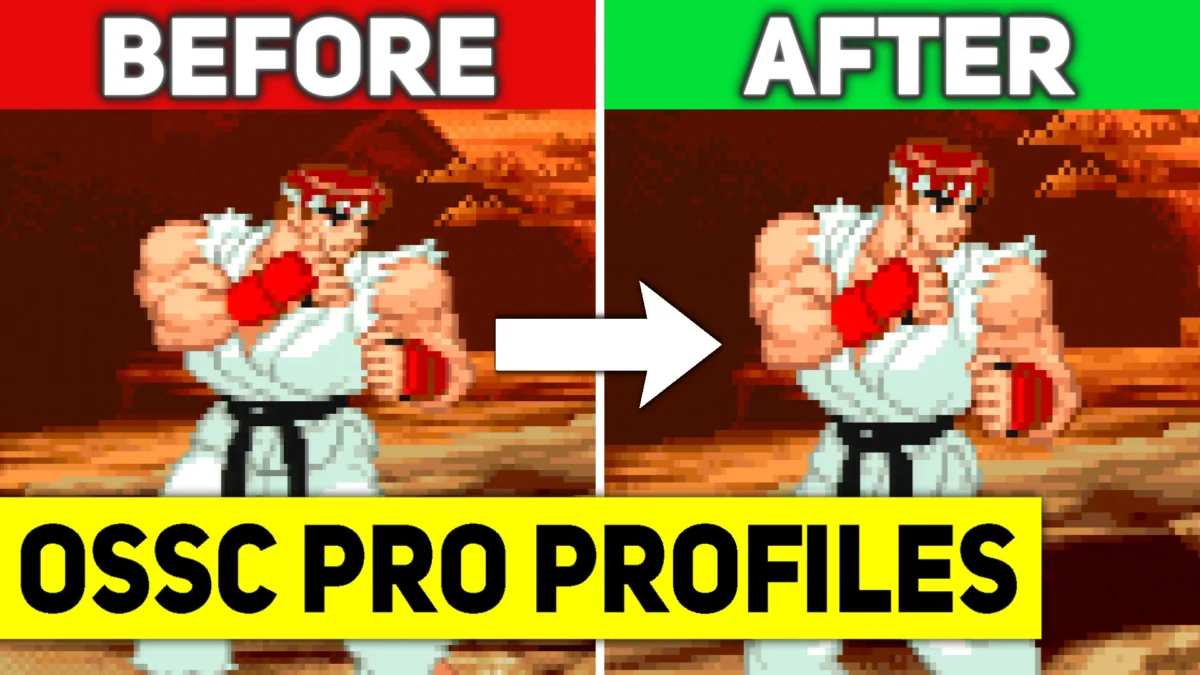
The retro gaming community is abuzz with the release of a significant update to the OSSC Pro profile pack by the esteemed contributor Wobbling Pixels, a development poised to further elevate the visual fidelity and user experience for owners of the advanced video scaler. This latest iteration, available for immediate download, represents a crucial enhancement for enthusiasts seeking to optimize their classic gaming consoles for modern display technologies. To fully leverage the benefits of these meticulously crafted profiles, users are advised to update their OSSC Pro units to firmware v0.82 or higher, a prerequisite that unlocks advanced functionalities essential for seamless integration and performance.
Understanding the OSSC Pro: A Pillar of Retro Gaming Preservation
The OSSC Pro, or Open Source Scan Converter Professional, stands as a cornerstone in the modern retro gaming landscape. Developed as a successor to the highly regarded original OSSC, this sophisticated FPGA-based video processor is designed to bridge the technological chasm between vintage gaming consoles and contemporary high-definition and 4K displays. Classic consoles, built for CRT televisions, output analog signals at resolutions and refresh rates vastly different from today’s digital flat-panel screens. Connecting these consoles directly to modern TVs often results in poor image quality, incorrect aspect ratios, significant input lag, and a host of visual artifacts.
The OSSC Pro addresses these challenges by performing real-time, low-latency upscaling, deinterlacing, and signal conversion. Unlike standard TV upscalers, which often introduce lag and compromise image integrity through excessive processing, the OSSC Pro aims for a pixel-perfect representation of the original signal. It supports a wide array of analog input formats, including RGBs, Component Video, Composite Video, and S-Video (with an optional module), transforming them into digital HDMI output compatible with modern displays. Its robust feature set, including extensive timing options, advanced line-doubling/tripling/quadrupling, and various filtering capabilities, empowers users to achieve stunningly crisp, vibrant, and lag-free visuals that often surpass the quality seen on original CRT setups. The device’s open-source nature also fosters a vibrant community of developers and enthusiasts who continuously contribute to its evolution through firmware updates and configuration profiles.
The Indispensable Role of Custom Profiles in Optimization
While the OSSC Pro hardware provides the foundation for superior video processing, unlocking its full potential often requires intricate configuration. The sheer number of adjustable parameters – encompassing sampling rates, timing adjustments, deinterlacing algorithms, aspect ratio corrections, and color space settings – can be daunting for even experienced users. This is where custom profiles become invaluable. A profile is a pre-configured set of settings specifically tailored for a particular gaming console, game, or even a specific display type, designed to extract the optimal image quality without requiring users to manually tweak dozens of parameters.
Wobbling Pixels’ profile packs are celebrated within the community precisely because they distill this complexity into easily loadable configurations. These profiles are not merely generic presets; they are the result of extensive research, rigorous testing across a multitude of consoles (from the NES and Super Nintendo to the PlayStation 2 and Xbox), and meticulous fine-tuning to ensure compatibility and optimal output. The statement that creating these profiles requires an "INSANE amount of work" is an understatement. It involves:
- Deep Technical Understanding: A profound grasp of video signals, display timings, and the OSSC Pro’s internal architecture.
- Extensive Hardware Library: Access to a wide range of consoles, display types (LCDs, OLEDs, projectors), and capture cards for analysis.
- Iterative Testing: Hours spent testing various combinations of settings, observing the results on different displays, and identifying subtle artifacts or improvements. This often involves frame-by-frame analysis to ensure perfect sync and minimal latency.
- Community Feedback Integration: Incorporating feedback from other enthusiasts to refine settings and address edge cases.
- Documentation: Creating detailed guides and spreadsheets to explain the profiles and their intended use.
The goal is to provide a "plug-and-play" experience as much as possible, allowing users to simply load a profile and instantly enjoy a high-quality retro gaming experience without diving deep into technical manuals. These profiles dramatically lower the barrier to entry for users who might otherwise be intimidated by the OSSC Pro’s advanced capabilities, making elite-level visual quality accessible to a broader audience.
Wobbling Pixels: A Catalyst for Community Excellence
Wobbling Pixels has established himself as a preeminent contributor within the OSSC Pro community, particularly for his dedication to creating and maintaining these essential profile packs. His work is consistently highlighted by key figures like Bob from RetroRGB, a leading voice and resource hub for retro gaming hardware and preservation. Bob’s platform, RetroRGB.com, serves as a vital conduit for disseminating information, tutorials, and community-driven developments, making it the go-to source for OSSC Pro updates. The collaborative spirit fostered by platforms like RetroRGB and the active involvement of individuals like Wobbling Pixels underscore the strength and self-sufficiency of the retro gaming enthusiast ecosystem. These contributions save the community countless hours of individual troubleshooting and experimentation, collectively raising the standard of retro gaming enjoyment.
Firmware v0.82: The Foundation for Enhanced Control
A critical prerequisite for utilizing the latest profile pack is updating the OSSC Pro firmware to version 0.82 or higher. This particular firmware release, developed by Marqs85, the primary architect of the OSSC Pro, introduced several key features that enhance the device’s functionality and user experience, directly impacting how profiles can be managed and accessed.

One of the most significant additions in v0.82 is the ability to assign profiles to remote control keys. Previously, navigating through numerous profiles might have involved more tedious menu diving. With this update, users can program their OSSC Pro remote to instantly switch to their favorite or most frequently used profiles with a single button press. This drastically improves usability, especially for those who frequently switch between consoles or games that require different optimal settings. For instance, a user could assign a "SNES" profile to button 1, a "PS2" profile to button 2, and a "Dreamcast" profile to button 3, allowing for fluid transitions between gaming sessions. This feature exemplifies the continuous commitment of the OSSC Pro development team to user-centric design, transforming a powerful device into an even more intuitive tool.
Beyond profile assignment, firmware v0.82 also laid groundwork for improved compatibility and performance, including better support for the composite and S-video output module, expanding the range of consoles that can benefit from the OSSC Pro’s advanced processing capabilities. This continuous cycle of hardware development, firmware refinement, and community-driven configuration updates ensures the OSSC Pro remains at the cutting edge of retro video processing.
Key Enhancements in the Latest Profile Pack (Dated 2026-07-01)
While the original article does not detail a specific list of changes in this particular update, previous releases and the nature of profile refinement suggest several categories of improvements that are typically addressed. Given the "2026-07-01" timestamp from Wobbling Pixels’ Bluesky post, this indicates an ongoing, iterative process of refinement. Such updates commonly include:
- Refined Timing Parameters: Minor adjustments to horizontal and vertical timings for specific consoles or game modes, often resolving subtle display glitches or improving image stability on particular monitor models.
- Enhanced Deinterlacing Settings: Optimization of deinterlacing algorithms for consoles that output interlaced signals (e.g., PS2, Xbox, Sega Saturn), aiming for sharper images with fewer motion artifacts.
- Expanded Console/Game Compatibility: New profiles or adjustments for recently discovered optimal settings for less common consoles, specific game variants, or even arcade boards.
- Improved Color Accuracy and Chroma Sampling: Fine-tuning color space conversions and chroma upsampling settings to ensure colors are reproduced as accurately as possible, especially for systems using YPbPr component video.
- Reduced Artifacts: Addressing subtle issues like ringing, ghosting, or pixel shimmer that might appear on certain displays or with specific console outputs.
- Support for New Features: Incorporating settings that leverage new firmware features, such as improved handling of specific resolutions or signal types.
- User Feedback Integration: Adjustments based on widespread community feedback regarding previous profile versions, aiming to provide a more universally optimal experience.
These incremental improvements collectively contribute to a noticeably superior visual experience, demonstrating the commitment to perfection that defines Wobbling Pixels’ contributions.
Implementation Guide for Users
For OSSC Pro owners eager to experience these enhancements, the process is straightforward:
- Firmware Update: First, navigate to the official OSSC Pro GitHub releases page (linked in the original article) and download the latest firmware, ensuring it is v0.82 or newer. Follow the provided instructions for flashing the firmware to your OSSC Pro unit. This process is generally well-documented and designed to be user-friendly.
- Profile Pack Download: Once the firmware is updated, download the latest profile pack from the Google Drive link provided by Wobbling Pixels. The profiles are typically provided as a collection of
.inifiles. - Loading Profiles: Transfer these
.inifiles to the SD card of your OSSC Pro. Once the SD card is inserted, users can load individual profiles through the OSSC Pro’s on-screen display menu. - Quick Access: As noted by Wobbling Pixels, firmware v0.82 allows users to assign frequently used profiles to the OSSC remote’s keys. The "p.load" button or the "10+" button (depending on the remote model and configuration) provides quick access to profile browsing and loading, streamlining the process significantly.
- Spreadsheet Guide: Crucially, users should consult the accompanying spreadsheet guide. This comprehensive document typically provides details on each profile, its intended use, specific console recommendations, and any caveats or advanced settings that might be useful. This guide is an indispensable companion to the profile pack, ensuring users can select the most appropriate settings for their setup.
The Broader Implications for Retro Gaming and Preservation
The continuous development and refinement of resources like Wobbling Pixels’ OSSC Pro profile pack have profound implications for the retro gaming community and the broader effort of video game preservation:
- Democratization of High-Quality Retro Gaming: By simplifying complex technical configurations, these profiles make it easier for a wider audience to enjoy classic games with optimal visual quality on modern displays. This lowers the barrier to entry for newcomers and enhances the experience for veterans.
- Extended Hardware Longevity and Value: The OSSC Pro, while a significant investment, gains increased utility and longevity through these community-driven updates. As displays evolve, profiles can be adapted to maintain compatibility and performance, ensuring the hardware remains relevant for years to come. This enhances the return on investment for users.
- Fostering Community Collaboration: The synergy between hardware developers (Marqs85), content creators (Wobbling Pixels), and community platforms (RetroRGB) exemplifies the power of open-source initiatives and passionate volunteerism. This collaborative model drives innovation and problem-solving at a pace often unmatched by commercial ventures.
- Enhancing Preservation Efforts: For many, the visual fidelity is integral to the authentic experience of playing classic games. By ensuring these games look their absolute best on modern screens, such tools contribute to the ongoing preservation of gaming history, making it more appealing for new generations to discover and appreciate these cultural artifacts.
- Driving Innovation: The continuous demand for better visual output from retro systems pushes the boundaries of video processing technology, influencing future developments in both consumer electronics and specialized retro hardware.
Community Collaboration and Future Outlook
The OSSC Pro, alongside its dedicated community of developers and contributors, represents a vibrant ecosystem where passion meets technical prowess. Bob from RetroRGB, by actively promoting and curating these resources, plays a pivotal role in strengthening this community. His Patreon support system, highlighted in the original article, is a testament to the fact that such invaluable contributions often rely on the generosity of the community they serve. This model ensures that talented individuals like Wobbling Pixels can continue their meticulous work, benefiting countless retro gaming enthusiasts worldwide.
As display technology continues to evolve, the need for adaptive and high-performance video scalers will only grow. The OSSC Pro, with its robust hardware and dynamic community support, is well-positioned to remain a leading solution in this space. The regular release of updated profiles and firmware ensures that the device can adapt to new challenges and continue to deliver an unparalleled retro gaming experience.
In conclusion, Wobbling Pixels’ latest update to the OSSC Pro profile pack is far more than a mere collection of settings; it is a testament to the enduring passion of the retro gaming community, the power of collaborative development, and the continuous pursuit of visual perfection for our beloved classic titles. It solidifies the OSSC Pro’s standing as an indispensable tool, making the intricate world of retro video scaling accessible and enjoyable for everyone.