 Vera Clarissa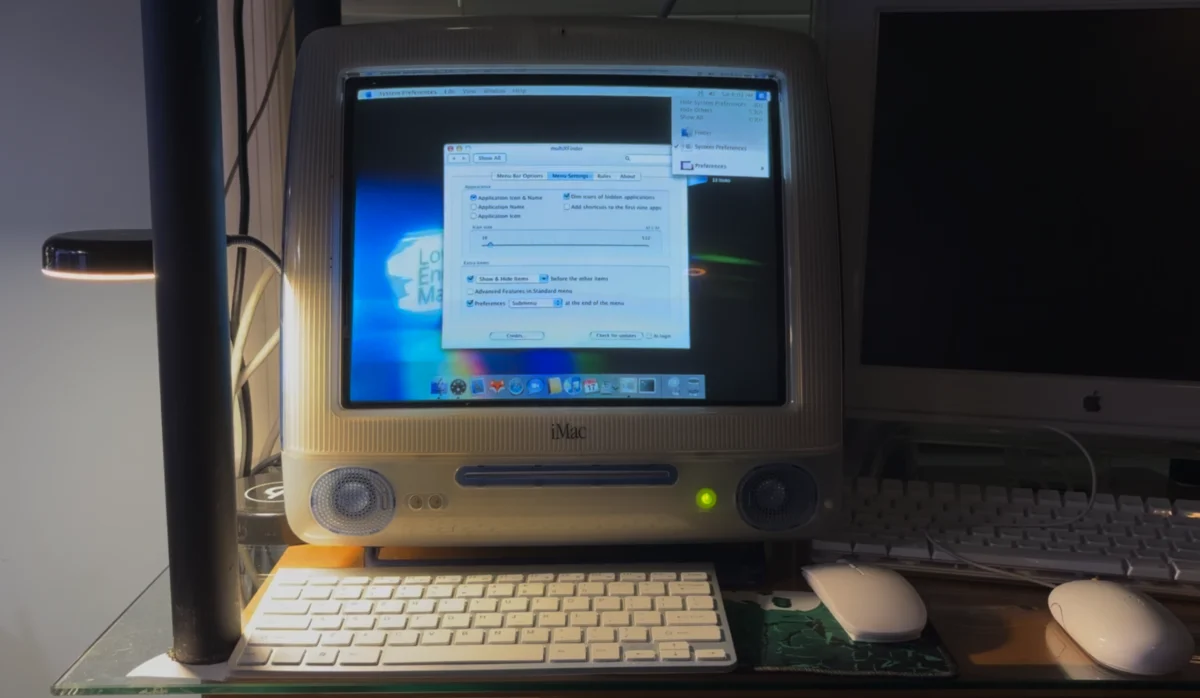
The release of MultiXFinder v0.5 marks a significant milestone in the preservation of classic macOS utility design, bridging a gap between the legacy computing era and contemporary Apple Silicon architecture. Originally conceived as a tribute to the classic Mac OS system behavior, the utility has been completely rewritten to move away from its former Assembly (ASM) foundations, allowing it to function natively on modern macOS environments while maintaining compatibility with legacy systems dating back to OS X 10.11 El Capitan. This transition ensures that users across the entire spectrum of Apple hardware—from high-end M4-powered workstations to legacy Intel-based machines—can leverage a consistent, streamlined application switching experience.

A Chronology of the MultiXFinder Project
The evolution of MultiXFinder is deeply intertwined with the history of third-party Mac customization tools. The project gained significant momentum in early 2009 when the current developer assumed responsibility for the x-asm project. At that time, the goal was to provide users with an efficient alternative to the Dock and the default application switcher, which had become increasingly resource-heavy for users running older hardware.
For over a decade, the utility functioned primarily as an Assembly-based project. However, the paradigm shift toward 64-bit architecture and the eventual introduction of Apple Silicon forced a fundamental re-evaluation of the codebase. The development of version 0.5 represents the first major release that abandons the ASM framework in favor of a modern codebase, a necessity for ensuring stability on macOS versions ranging from El Capitan through the latest releases. This long-term support cycle is a rarity in the utility software market, where developers often abandon support for legacy operating systems to focus exclusively on current-year releases.

Technical Architecture and Modern Integration
The shift to a modern, non-ASM foundation has allowed for significant improvements in system integration. Unlike previous iterations that required complex installation procedures, version 0.5 follows the standard drag-and-drop paradigm, making it accessible to a broader user base. By moving away from older hooks that often triggered system instability on modern kernels, the developers have achieved a level of parity that allows the application to behave exactly as its predecessors did, while adhering to the strict security and performance guidelines of modern macOS.
One of the most notable technical features is its persistent icon placement. By default, the application restricts its presence to the screen currently in use by the active window. In multi-monitor setups—particularly those involving large-format displays or varying display technologies like VA (Vertical Alignment) panels—this feature provides a critical visual cue regarding which display is currently capturing input. For power users managing multiple hardware inputs, such as toggling between an M4 Mac mini and a legacy Mac Pro, this functionality serves as an essential indicator of the active work environment.

Furthermore, the software offers a "highlight" mode that allows users to adjust the visual appearance of the menu bar area. While this feature can overlap with system elements like the date and time, it increases the total clickable surface area, addressing accessibility concerns for users working on displays with specific viewing angles or high-density resolutions.
The Role of Utility Software in Hardware Longevity
The persistence of MultiXFinder highlights a broader trend in the Apple ecosystem: the desire to maintain specific workflows across decades of hardware transitions. For many users, the utility is not merely a preference but a functional necessity. On older machines, such as the iMac G3, the software played a vital role in conserving limited screen real estate by allowing the Dock to remain hidden. In those environments, the ability to switch applications directly from the menu bar bypassed the graphical overhead of the Dock, a critical optimization for hardware equipped with limited VRAM, such as the 8 MB ATI Rage 128 Pro cards found in early 2000s hardware.

Today, that same philosophy applies to modern, high-resolution workflows. On a modern display, the clutter of an ever-present Dock can detract from focus; by offloading the task of application switching to the menu bar, users can reclaim vertical screen space. The fact that the same software architecture that supports a 400 MHz G3 processor can also manage an Apple Silicon M4 chip is a testament to the utility’s efficient design and the developer’s commitment to platform-agnostic performance.
Implications for Legacy Support and Future Development
The release of MultiXFinder v0.5 provides a case study in sustainable software maintenance. By supporting OS X 10.11 through current macOS releases, the developer has effectively created a cross-generational bridge. This approach is particularly valuable for professional environments where legacy hardware must coexist with modern infrastructure.

From an analytical standpoint, the longevity of this utility suggests that there remains a significant demand for "classic" interface paradigms that prioritize speed and keyboard-centric navigation over the more fluid, animation-heavy interface elements introduced in later versions of macOS. By providing a low-footprint alternative to native task-switching, MultiXFinder ensures that users who prefer a minimalist, high-efficiency interface are not forced to abandon their workflow as they upgrade their hardware.
Broader Impact on the User Community
The reaction from the Mac enthusiast community has been largely positive, citing the utility’s reliability as a key factor in its enduring popularity. The ability to "drop in" the application to replace or supplement existing system features—such as Spotlight for users who prefer to disable indexing for performance reasons—demonstrates the flexibility that such third-party tools provide.

As Apple continues to iterate on its hardware and software, the role of independent developers in bridging gaps—whether for performance, accessibility, or personal workflow preference—remains essential. The transition of MultiXFinder from a legacy ASM-based tool to a modern, Apple Silicon-compatible utility ensures that the project remains relevant for the next decade of computing. By focusing on stability, cross-platform compatibility, and an unchanged user experience, the developers have ensured that this specific corner of Mac history continues to evolve rather than fade into obsolescence. The continued availability of such tools confirms that, despite the rapid pace of technological change, there is a sustained value in software that respects the user’s established workflow and provides reliable, performant solutions across diverse hardware generations.